Guild icon
S3Drive
Community / support / Sort by mtime instead of Last Modified?

Avatar
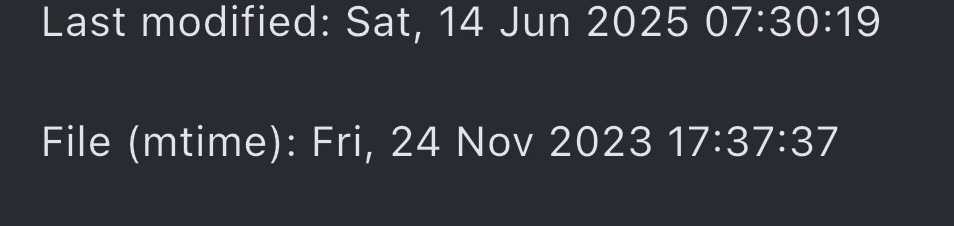
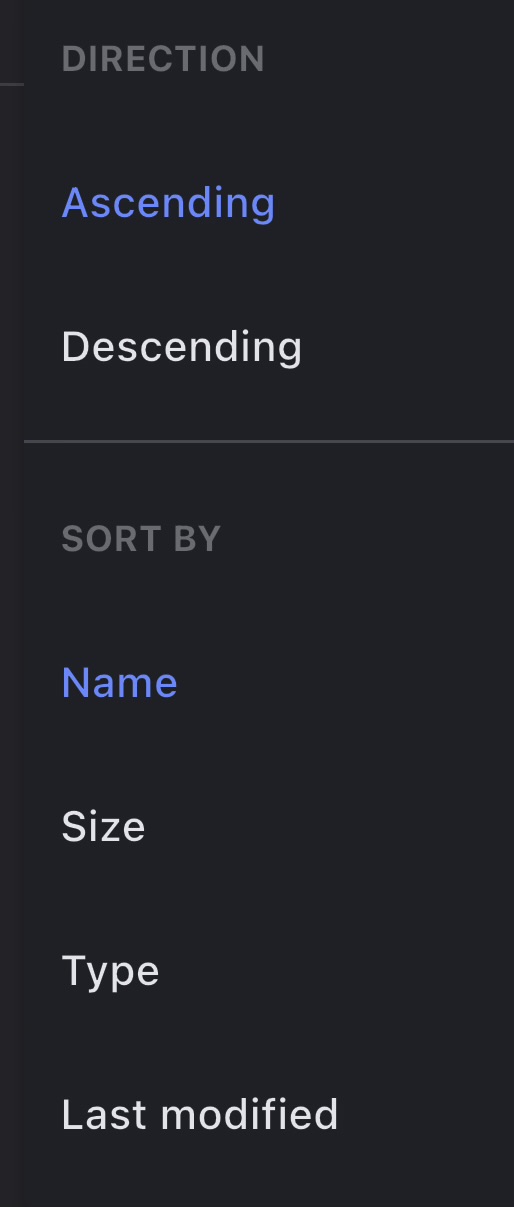
Hi! I was wondering if we could sort by mtime instead of Last Modified. I find that when uploading using S3Drive, it changes the Last Modified date to whenever it was uploaded instead of retaining the photo/video's date. However, looking at the properties of uploaded files, it has mtime which accurately reflects when the photo/video was taken. Is it possible to have that as a sort option?
👍 1
Avatar
Hi, That's a nice feature request! I can confirm that sort by mtime will be available for S3Drive storage, however we can't implement it on external S3 or Rclone back-ends due to technical limitations -> mtime isn't available in the listing and only available in file specific metadata requests.
Avatar
Avatar
Tom
Hi, That's a nice feature request! I can confirm that sort by mtime will be available for S3Drive storage, however we can't implement it on external S3 or Rclone back-ends due to technical limitations -> mtime isn't available in the listing and only available in file specific metadata requests.
is this still in the works? I am considering using a different photo service entirely because s3drive doesn't seem to sort this way still
Avatar
Hi @booga, we'll prioritise that feature, but be aware it will be available for S3Drive built-in storage only.
Avatar
Avatar
Tom
Hi @booga, we'll prioritise that feature, but be aware it will be available for S3Drive built-in storage only.
Yeah, thats what im currently using
10:58 PM
would be great to see it soon, but otherwise ill just look somewhere else
Avatar
Hi @booga, what's your OS? This was actually included in a most recent release.
Avatar
Avatar
Tom
Hi @booga, what's your OS? This was actually included in a most recent release.
Using fedora, maybe I haven't updated it yet?
6:22 PM
is this also released to the android client?
Avatar
Avatar
Tom
Hi @booga, what's your OS? This was actually included in a most recent release.
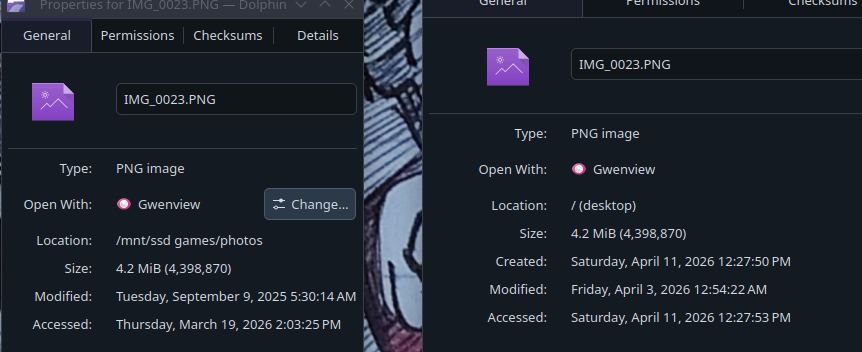
so it seems like it works sometimes, but alot of uploads got their modified time changed when they were uploaded to S3Drive
7:29 PM
an example here:
7:29 PM
the left is from my hard drive, right is downloaded from s3drive
7:29 PM
so theres tons and tons of photos that just arent sorted correctly now (edited)
7:35 PM
it seems like stuff that was uploaded from my android phone had their modified dates changed
7:35 PM
maybe also my ipad
Avatar
@Tom any update on why this is happening?
Avatar
Avatar
booga
so theres tons and tons of photos that just arent sorted correctly now (edited)
this exact issue is why I stopped using an E2EE photo storage service, after uploading my gallery and then downloading it, all the photos modified times were changed and I could no longer properly sort/view the downloaded gallery in file explorer for example.
6:29 PM
Avatar
Avatar
nllfy
this exact issue is why I stopped using an E2EE photo storage service, after uploading my gallery and then downloading it, all the photos modified times were changed and I could no longer properly sort/view the downloaded gallery in file explorer for example.
what solution would you recommend?
6:29 PM
I dont even really want the e2ee
Avatar
well, honestly this is kind of why I decided to switch to S3drive, but I never really even got around to testing it out (I've still yet to upload all my stuff via s3drive :D)
6:31 PM
but now I know the same exact issue happens here as well, so I guess the only option is to use some sort of exif data tool that edits the files / sorts them. (edited)
6:34 PM
for example https://exiftool.org/ (edited)
A command-line application and Perl library for reading and writing EXIF, GPS, IPTC, XMP, makernotes and other meta information in image, audio and video files. For Windows, MacOS, and Unix systems.
Avatar
Avatar
nllfy
this exact issue is why I stopped using an E2EE photo storage service, after uploading my gallery and then downloading it, all the photos modified times were changed and I could no longer properly sort/view the downloaded gallery in file explorer for example.
In principle E2EE has nothing to do with file modification times. Yes it may be harder to preserve mtime with E2EE, but both S3Drive and Rclone (incl. crypt) preserves file mtime which is the file modification time as displayed by your OS. If your image has already invalid mtime at the time of the upload that's what would end up on S3Drive. (edited)
1:41 PM
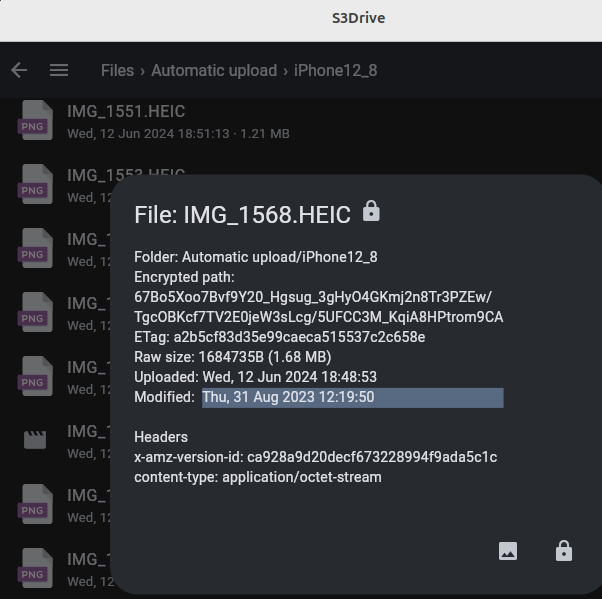
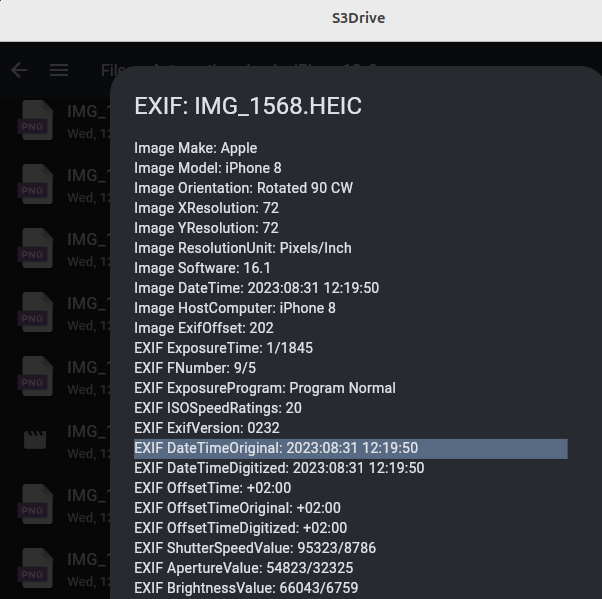
Having said that, it's possible to set mtime from EXIF data using some simple scripts. My suggestion would be to try building a script (or ask AI to help you build one) to restore mtime from EXIF. E.g. exiftool "-FileModifyDate<DateTimeOriginal" *.jpg or even: exiftool "-FileModifyDate<DateTimeOriginal" "-FileModifyDate<CreateDate" -r . Bear in mind that it would be good to backup your files just in case you mess up. Once you have it in place, you can reupload data to S3Drive and see whether it works. You can preview mtime, as well as EXIF data using S3Drive (please see attached screenshots)
Avatar
Avatar
Tom
In principle E2EE has nothing to do with file modification times. Yes it may be harder to preserve mtime with E2EE, but both S3Drive and Rclone (incl. crypt) preserves file mtime which is the file modification time as displayed by your OS. If your image has already invalid mtime at the time of the upload that's what would end up on S3Drive. (edited)
I ran a quick test just now, took a picture with my android and uploaded to s3drive then downloaded on windows, the modified time is in fact correct! I also had no idea we could view the exif data inside s3drive (and open the map), that's awesome! 😄 (edited)
👍 1
Exported 26 message(s)
Timezone: UTC+0