
Guild icon
S3Drive
Community / support / Rclone config help

Avatar
I need help configuring a Rclone mount using the S3 drive credentials. I have configured the Rclone correctly, but I cannot mount the files in the folder. running this rclone mount cf-secret:personal ~/cf-personal Results in an empty directory. Please help :)

Avatar
Avatar
lmtr0
I need help configuring a Rclone mount using the S3 drive credentials. I have configured the Rclone correctly, but I cannot mount the files in the folder. running this rclone mount cf-secret:personal ~/cf-personal Results in an empty directory. Please help :)
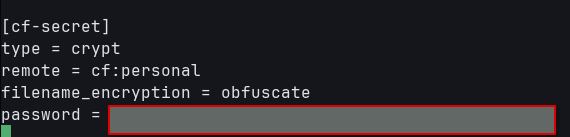
Hi, Are you using crypt? If so, is that V1 or V2? What's the output of: rclone ls cf-secret:personal or rclone ls cf-secret, does it return anything? How did you configure S3Drive storage in Rclone, have you used S3 API key generated from the S3Drive client?
Avatar
Avatar
Tom
Hi, Are you using crypt? If so, is that V1 or V2? What's the output of: rclone ls cf-secret:personal or rclone ls cf-secret, does it return anything? How did you configure S3Drive storage in Rclone, have you used S3 API key generated from the S3Drive client?
I don't know which version of crypt I have, can you help me discover? rclone ls cf-secret:personal gives empty output rclone ls cf-secret: 2026/04/22 11:56:48 NOTICE: 042l-nql434DyZiFVwzSsw/1o8_r1J_H4wa_zJsXG7cmvNy19J2oZ1iCRZjJAKD7ppSxv41SEbeiHe0gNDBh2Kq: Skipping undecryptable file name: not an encrypted file - does not match suffix 2026/04/22 11:56:48 NOTICE: 042l-nql434DyZiFVwzSsw/1oUkmoD8-QhSw-pJfdswN-3qckXxHwiNf56bAarLsmgp3uui9PEd3_s8DGia7ptW: Skipping undecryptable file name: not an encrypted file - does not match suffix a much more
2:57 PM
Avatar
What's cf ? Is that Cloudflare or S3Drive?
Avatar
cloudflare
2:59 PM
s3drive is also configured with cloudflare as the backend
Avatar
Avatar
lmtr0
s3drive is also configured with cloudflare as the backend
... so it works through S3Drive, but you also want it to work using Rclone CLI? Is that correct?
Avatar
I have a remote I need to mount on a vm which only has access to rclone. This remote is also configured in s3 drive. Both of them are backed by cloudflare r2 bucket
3:01 PM
does it make sense?
Avatar
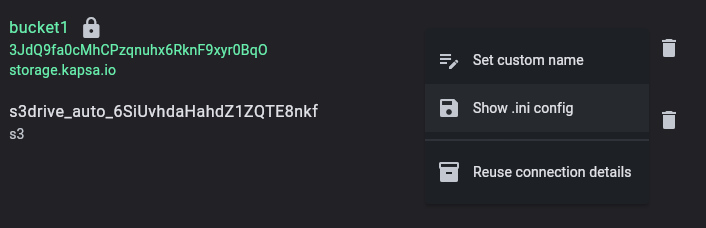
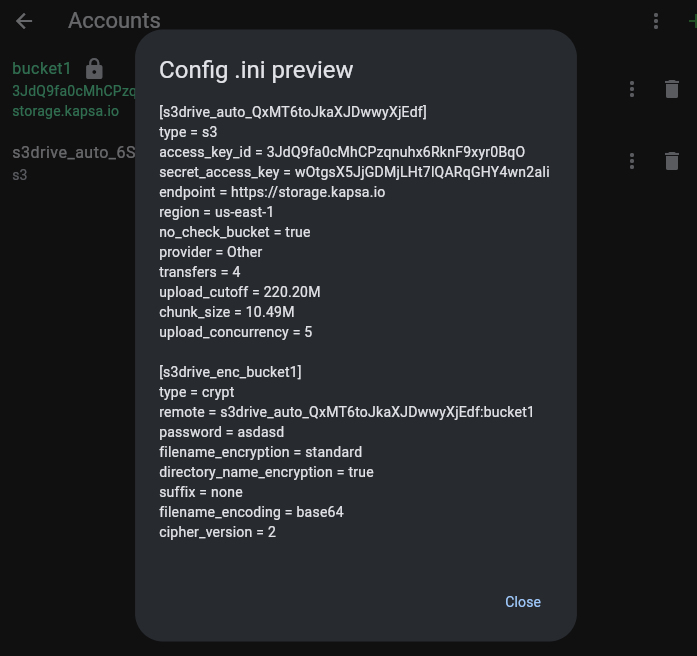
Yes. In a most recent S3Drive version (not yet released), there will be an option to export Rclone .ini config for S3 configured credentials, but before then you can try mimick config as per attached screenshot or as per our guide: https://docs.s3drive.app/advanced/#sample If you need V2 cipher support (enabled in S3Drive by default) you would need to build Rclone yourself: https://docs.s3drive.app/advanced/v2support/ however based on your error messages it seems that you didn't get to that point just yet. It seems that your crypt config misses at least this: filename_encoding = base64 filename_encryption = standard directory_name_encryption = true suffix = none
Personal storage compatible with S3, WebDav and 70+ other Rclone back-ends
Avatar
let me check
3:09 PM
Ok, it seems to be working, here is one issue: 2026/04/22 12:09:00 ERROR : IO error: not an encrypted file - bad magic string repeated logs
Avatar
Avatar
lmtr0
@Tom
You need Rclone with V2 support as per our guide: https://docs.s3drive.app/advanced/v2support/ We've open-sourced it https://github.com/rclone/rclone/issues/7192 but they're awaiting maintainer's response at the moment. What's your OS? If you have problem building it, we're more than happy to help out.
Personal storage compatible with S3, WebDav and 70+ other Rclone back-ends
We're running S3Drive (GUI for S3 on desktop, mobile, web) and recently aligned with Rclone's encryption scheme for better interoperability and features like drive mount and Webdav that we ...
Avatar
Fedora 42
5:45 PM
Got it. I'll take a closer look
Exported 17 message(s)
Timezone: UTC+0