I have a problem that I am facing multiple times on multiple patforms.
I have the Ultimate lifetime licence and I am experimenting with SDrive on both Windows and Macos..
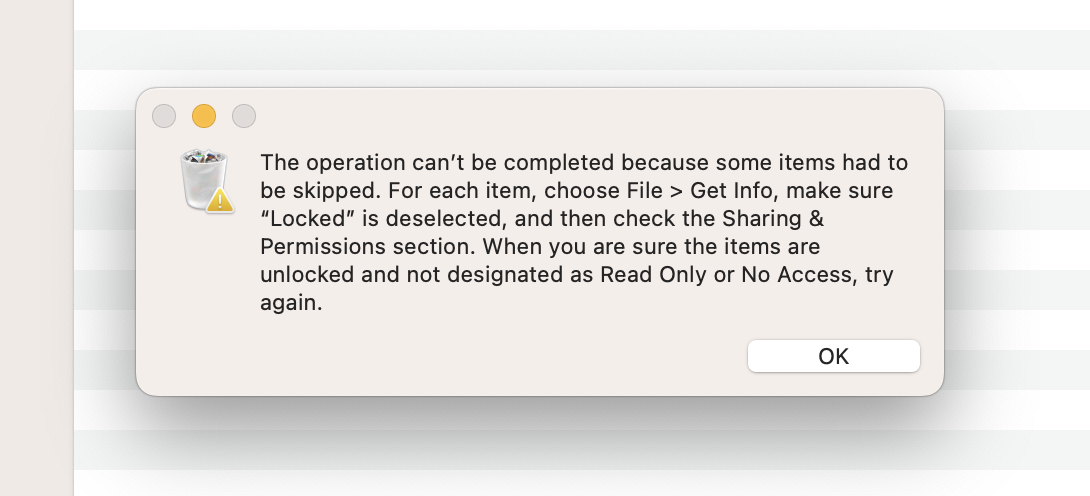
The problem is almost always when i try to move files or folders to different location (for example from rclone mount to local drive) the folders on the remote somehow get locked and can't be deleted.
I have tried re-mounting the remote, cleaning cache but nothing helps.
Here is a screenshot from macos that appears when i try to delete a "locked" folder
I couldn't find anyone having the same issue here on discord.
Am I doing something wrong?
Hi @imagineD,
Thanks for your message. What's your S3Drive version? Do you use S3 or Rclone connection? Does managing files from S3Drive GUI itself works fine for this connection?
1. Latest S3Drive v. 1.15.9
2. Rclone connection, forgot to mention, the rclone remote is actually a Local directory which I mount as an encrypted remote with S3Drive app, so the files in the derectory are encrypted, and then i sync the directory on some clouds with their native apps.
3. When i try to delete the folders from the S3Drive app nothing happes when i click the Delete button, and the folders stay
2:07 PM
I just tried restarting the computer completely and the problem still persist
Update: I tried using rclone directly to see what happens and strangely the log showed an error that the directory is not empty even though the local directory was empty (no any files inside, even hidden)...
I then tried to open the locked directories directly in the cloud and indeed there were some files in all dirs that cant be deleted. It's strange that the files are not synced in the local dir for some reason
Can you share what's the underlying provider/cloud? (EDIT: I've misread previously, you've said it's Local Directory, got it).
We would need to set it up and see, it's first time we see such an issue.(edited)
2:20 PM
Alternatively you can try using Rclone CLI and use basic commands like delete, copy, list and see whether things work for fine for this back-end.
I am experiencing this issue with multiple clouds im testing, one is Nextcloud another is MEGA...
I now think the problem is not in the S3 app itself but maybe something with rclone.
I can't figure out how rclone shows there is file in the local directoies (crypt mount) and when i open them in the finder there is nothing, but the same directories synced on the cloud contain some files.
2:27 PM
Can you suggest me what's the best config regarding using cache, for having a Local crypt mount which will then be automatically synced on cloud (with the native client).
imagineD
I am experiencing this issue with multiple clouds im testing, one is Nextcloud another is MEGA...
I now think the problem is not in the S3 app itself but maybe something with rclone.
I can't figure out how rclone shows there is file in the local directoies (crypt mount) and when i open them in the finder there is nothing, but the same directories synced on the cloud contain some files.
Sorry, I didn't have chance to look at it earlier, but now realised that the back-end that you refer to is actually a local directory.
Can you share your crypt configuration? (Please redact out password fields)
Can you suggest me what's the best config regarding using cache, for having a Local crypt mount which will then be automatically synced on cloud (with the native client).
I think I wouldn't rely on native cloud clients syncing the encrypted raw output of crypt mount, instead I would use Sync.
Technically your approach should work, but I am not actually sure whether such design is smart enough to not duplicate the cache.
Normally when mount is connected to cloud (not local dir), the VFS cache is created to allow mutual read/write and to speed up reads/opening etc.
How it works with local FS and crypt wrapper I am not sure, but there is a chance, that it recreates VFS cache (instead of pointing directly to FS).
Instead I would setup these clouds through S3Drive, enable E2EE (and adjust location of encrypted folder if required, please see here: https://discord.com/channels/1069654792902815845/1445242455753490643/1445330398568648747) and then use Sync tool to reliably sync the data.
You can achieve the same using native Rclone CLI: https://rclone.org/commands/rclone_sync/