Guild icon
S3Drive
Community / support / Mount behaviour with Proton drive
Avatar
Hello, I just purchased Ultimate license + 600gb storage. My goal was
  • to be able to mount my proton drive on my linux computer
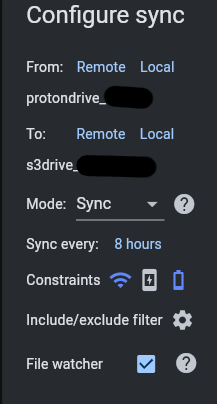
  • to be able to sync my whole proton drive to S3 drive storage as backup But i think i'm a bit lost with the different upload funcitonnalities. Once i mounted my proton drive, it does work to read files, but if i paste a file inside the mounted dir, is it supposed to upload it to my proton drive ? I just realized it doesnt and I'm not sure if its a bug or intended. If intended, how could i achieve similar fonctionnality ? Also considering the sync can you confirm the provided settings screenshot will copy the content of my proton drive to the S3 Drive every 8 hours and not the other way around and completly wipe my data ? I think I got it correctly but I'm a bit anxious 😅 Any help/documentation guidance/example would be appreciated.
Thanks in advance and have great day !
(edited)
Avatar
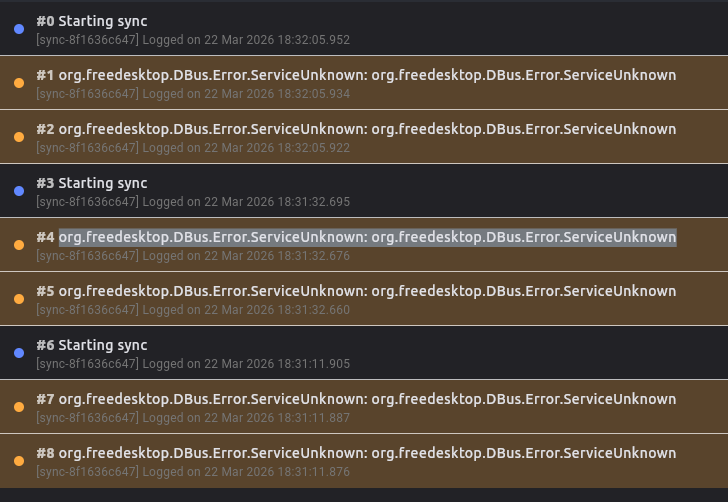
Concerning the second point, after fiddling with tests drives, I think I understand how to setup sync. I managed to setup a sync from a fresh google drive with a few files, to my S3Drive storage. So i decided to replicate the setup from my real drive (proton drive with around 100Go data) to my S3Drive. Problem: as soon as sync is triggered I got this errors, and my windows closes completely... Any ideas ?
Avatar
Avatar
hugo
Concerning the second point, after fiddling with tests drives, I think I understand how to setup sync. I managed to setup a sync from a fresh google drive with a few files, to my S3Drive storage. So i decided to replicate the setup from my real drive (proton drive with around 100Go data) to my S3Drive. Problem: as soon as sync is triggered I got this errors, and my windows closes completely... Any ideas ?
I think proton drive + rclone is really terrible right now.... I've been trying to sync from local to remote proton drive for hours and it always goes down to 0 bytes/second within about 2 minutes
🥲 1
Avatar
Just realized that other posts seems to have similar issues and have no response from the dev since a few months. See "Not syncing/slow syncing on Linux" and "Two-way sync error with Proton Drive". Should I ask for a refund ? (edited)
Avatar
Hi @hugo, currently Proton Drive isn’t well supported due to API changes on the Proton side, however there are already community improvements patches which are expected to be available in a month or two. I am sorry to disappoint you but these issues aren’t really something we can easily fix and need to wait for Proton specific code to be improved. If you’re unhappy with the current product we can refund your order, no problem.
Avatar
Alright, thanks for your answer, I will ask for a refund for now then. Best of luck to you guys though and have a nice day.
Avatar
Proton has been a big problem for Rclone and is beyond their control. They have no maintainer for the proton backend. Proton has published an SDK and if they produced a GO SDK it might be that Nick Craig-Wood could be persuaded to maintain Proton could produce a backend or client themselves. See: https://forum.rclone.org/t/proton-drive-x-rclone/53609
Hi all, I'm an engineer at Proton and would like to provide some information to people using our service with rclone and how we currently keep rclone functional. Changes to the upload flow We do not intentionally introduce breaking changes that would disrupt third party clients. In early 2024 we rolled out a new data‑integrity mechanism for...

Exported 7 message(s)
Timezone: UTC+0