
Guild icon
S3Drive
Community / support / Memory leak on macOS

Avatar
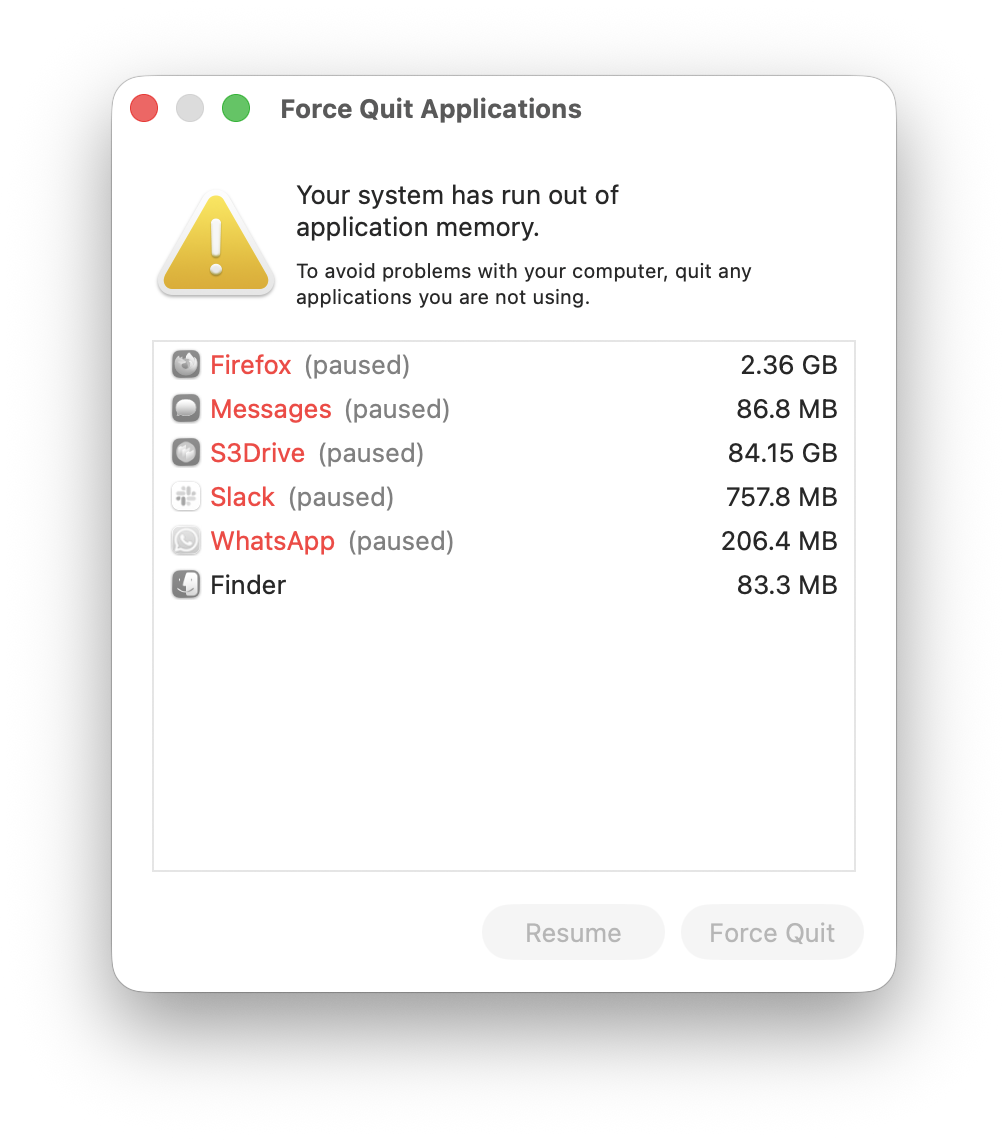
I woke up to the situation in the screenshot two days in a row earlier this week. Since then I've avoided the crash by quitting and reopening the app a couple of times per day. I still see the memory footprint growing monotonically over time. I'm on macOS 26.2 (Tahoe). The s3Drive app version is v1.16.0 (build: 10160002). I'm on the Storage 600GB plan, which also provides an Ultimate license. I have four background sync jobs running, all on 12 min intervals:
  • Copy downloading from encrypted s3Drive storage remote
  • Copy uploading to encrypted SFTP remote
  • Two-way sync with encrypted SFTP remote
  • Two-way sync with encrypted local folder
At the moment, the content of these folders changes very rarely, so these jobs are almost always no-ops. Here's s3Drive's full rclone config (redacted): [crypt_my.sftp.remote] type = crypt suffix = none directory_name_encryption = true filename_encoding = base32 filename_encryption = standard password = XXX remote = my.sftp.remote:crypt [crypt_local] type = crypt suffix = none directory_name_encryption = true filename_encoding = base32 filename_encryption = standard password = XXX remote = /Users/me/crypt_local [my.sftp.remote] type = sftp key_pem = XXX md5sum_command = md5sum port = 22 sha1sum_command = sha1 -r shell_type = unix user = XXX host = XXX [s3drive_auto_XXX] type = s3 no_check_bucket = true provider = Other transfers = 4 access_key_id = XXX chunk_size = 10.49M endpoint = https://storage.kapsa.io region = us-east-1 secret_access_key = XXX upload_concurrency = 5 upload_cutoff = 220.20M [s3drive_enc_username] type = crypt directory_name_encryption = true filename_encoding = base64 filename_encryption = standard password = XXX remote = s3drive_auto_XXX:bucket suffix = none Let me know if I can provide any more info.

Avatar
Thanks for this comprehensive bug report... and I must say either your macOS has a lot of memory or a lot of swap was used here. 84.15GB that's some insane numbers! It would be good to understand if problem is tied to some specific configuration or every single of them gradually over time adds some memory footprint. Do you think that any of particular Sync action might contribute to this problem more than other? Would you be able to help us understanding problem is related to any single job or all of them? E.g. could you keep all jobs paused except the first one Copy downloading from encrypted s3Drive storage remote, then keep app running as always and monitor RAM. If it's all good then you could pause this job and unpause 2nd, and so on. Obviously if you don't have time or willingness to do couple more tests, that's fine, we'll need to reproduce this on our ends and trace where the memory leak is. Thanks! (edited)
Avatar
I do have a lot of memory, but not that much, so definitely a lot of swap. Anyway, I'll try running the jobs one by one over the next few days and check back in if I discover anything.
Avatar
Update: Been running only the s3Drive storage down-copy for just about 2 days (48 hours and 34 minutes), and the memory usage is steadily creeping upwards, but very slowly. After starting the app and completing the first sync it was somewhere between 120 MB and 150 MB, and now it's at 544 MB. No explosion to 84 GB yet. (edited)
Avatar
Avatar
danielwe
Update: Been running only the s3Drive storage down-copy for just about 2 days (48 hours and 34 minutes), and the memory usage is steadily creeping upwards, but very slowly. After starting the app and completing the first sync it was somewhere between 120 MB and 150 MB, and now it's at 544 MB. No explosion to 84 GB yet. (edited)
Thanks for your feedback. In a most recent: 1.16.2+1 release we've improved app memory usage in the area of multipart uploads, but also freeing up memory for Sync (and other Rclone) actions. This might improve the situation and/or reduce ration where memory creeps upwards, although I am still not quite sure whether this is going to address "explosions to 84GB" which I believe might be caused by some other malfunction. I would appreciate if you could give it a go and let me know if you've observed and positive change. Thanks!
Avatar
Alright, I updated and re-enabled the 3 other sync jobs. Let's see how it goes! Two comments on the update, unrelated to the memory issue:
  • I have "Check new version" enabled in the settings, but haven't been notified of either 1.16.1 or 1.16.2. Is this expected?
  • After updating I wasn't able to stop/toggle the sync job that had been running before the update. Clicking the Stop/Start button did nothing. For the jobs that had not been running, everything worked. Restarting the computer fixed this. (I'm sure there exists a less nuclear fix, but this is the one I found.) Everything working now, so no worries.
Exported 6 message(s)
Timezone: UTC+0