
Guild icon
S3Drive
Community / support / Media backup - ability to preserve Date Modified with S3 backend (Backblaze B2)

Avatar
DrInvincibilis 12/24/2025 11:27 AM
Hi #support I am evaluating s3drive solution, and it seems quite nice so far, except that my wanted use case is: being able to browse photos on macOS, given the correct Date Modified timestamp in the mount folder. All the photos that I backed up are time-stamped with the upload date, not the date the photo was captured. Would it be possible to:
  • have Media Backup store files in an S3 bucket with a metadata property representing the photo capture timestamp
  • have macOS mount (with rclone I guess) interpret this metadata property and render the files Date Modified with that photo capture timestamp
I think it is all related to the rclone configuration: https://rclone.org/s3/#modification-times-and-hashes Thanks
Rclone docs for Amazon S3
11:33 AM
Maybe changing configuration from native S3 to rclone based would help?
Avatar
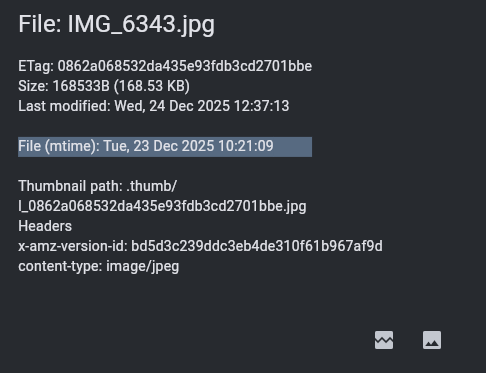
Hi @DrInvincibilis, In principle S3Drive uploads mod time (for both S3 and Rclone endpoints), as long as its available on the file level. Format that's used for storing mod time is cross-compatible between S3Drive/Rclone, so you can switch tools and in principle everything shall be preserved. Dates displayed on the listing (for S3 endpoints) correspond to the upload date (that's the nature of S3 protocol), not file modification time, but if you use "Properties" on an uploaded file then you shall be able to see the File (mtime) (please see the screenshot). If you then download that file from S3Drive to your FS either using Download or Sync or any other functionality then original modtime shall be preserved based on that mtime header. Having said that, I am not quite sure whether Media backup has access to photo modification time. We'll need to check that actually. I presume you refer to iOS? (edited)
Avatar
DrInvincibilis 12/24/2025 11:42 AM
Hi @Tom thanks for the prompt answer. My issue is:
  • Media Backup in iPhone
  • s3Drive mount in macOS
  • all the photos backed up are having both Date Created and Date Modified as the upload date not the photo capture date
  • mtime in the Backblaze browser is set to upload date
The goal is as above: photos in the mount folder have Date Modified as the date of photo capture.
(edited)
11:46 AM
wonder when I switch to rclone config would this have an effect https://rclone.org/s3/#modification-times with rclone configuration is the sort of "rclone" library invoked underneath?
Rclone docs for Amazon S3
Avatar
Avatar
DrInvincibilis
wonder when I switch to rclone config would this have an effect https://rclone.org/s3/#modification-times with rclone configuration is the sort of "rclone" library invoked underneath?
Feel free to give it a go, but I doubt it will help. I will pass that that to our team to check. We may find some workaround or quick fix to make media backup respect mod time. (edited)
Avatar
DrInvincibilis 12/24/2025 11:52 AM
Thanks looking forward to solutions or workarounds
11:54 AM
...given the S3 metadata property as in rclone config I can set e.g. lifecycle rules for cleaning/archiving etc
Avatar
Avatar
DrInvincibilis
...given the S3 metadata property as in rclone config I can set e.g. lifecycle rules for cleaning/archiving etc
Which flag/config you refer to specifically? In most cases lifecycle rules are set not on the config level, but on the bucket level (through the UI of your provider).
Avatar
DrInvincibilis 12/24/2025 12:05 PM
This one: X-Amz-Meta-Mtime is not set by Media Backup I guess. And should be the Photo original date. (edited)
Avatar
Avatar
DrInvincibilis
This one: X-Amz-Meta-Mtime is not set by Media Backup I guess. And should be the Photo original date. (edited)
Thanks, that's helpful, we'll check that out and see what we can do.
👍 1
Avatar
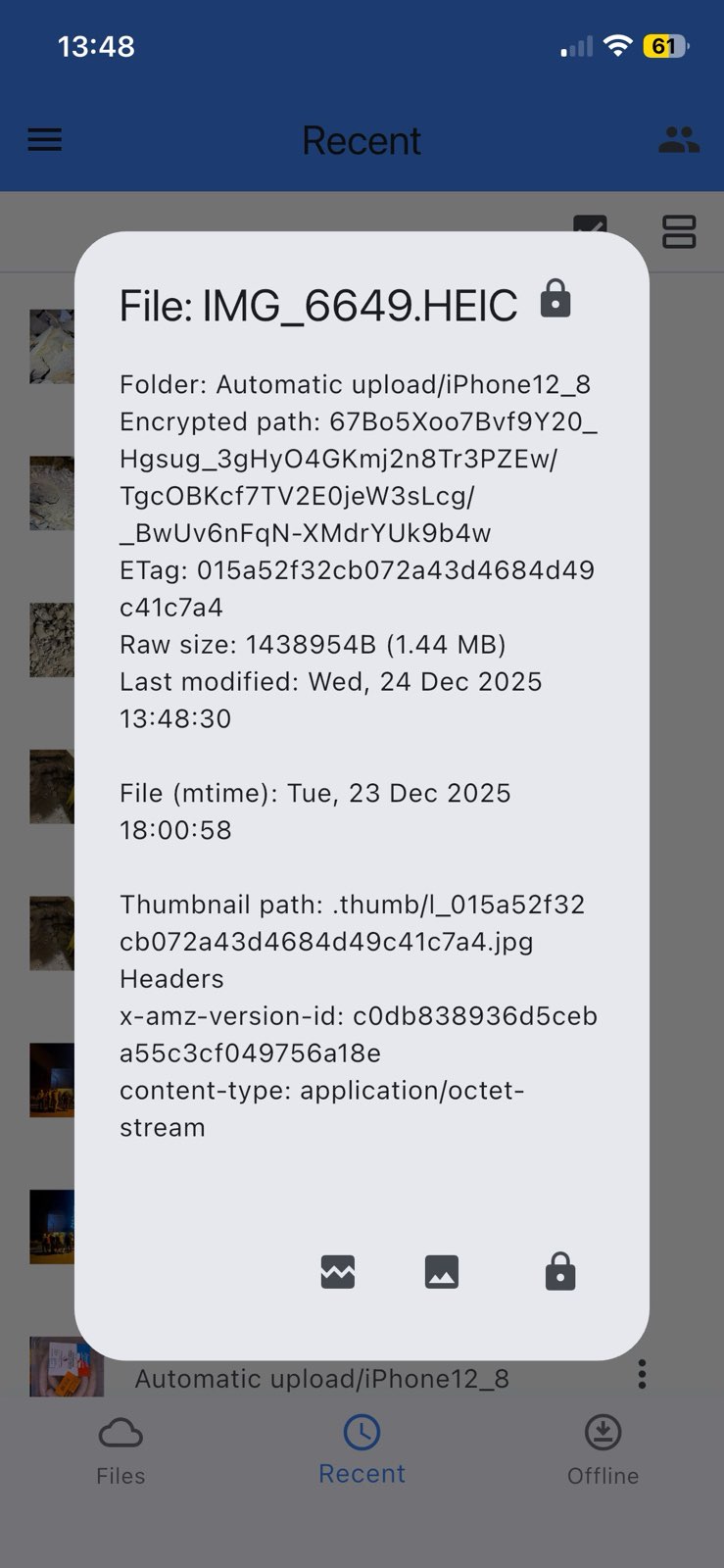
I've actually had chance to check it myself on latest iOS and once file was uploaded using media backup, mtime was set correctly. Not quite sure why it's not set in your case.
Exported 12 message(s)
Timezone: UTC+0