Guild icon
S3Drive
Community / support / Error when I try to rename the google drive connection

Avatar
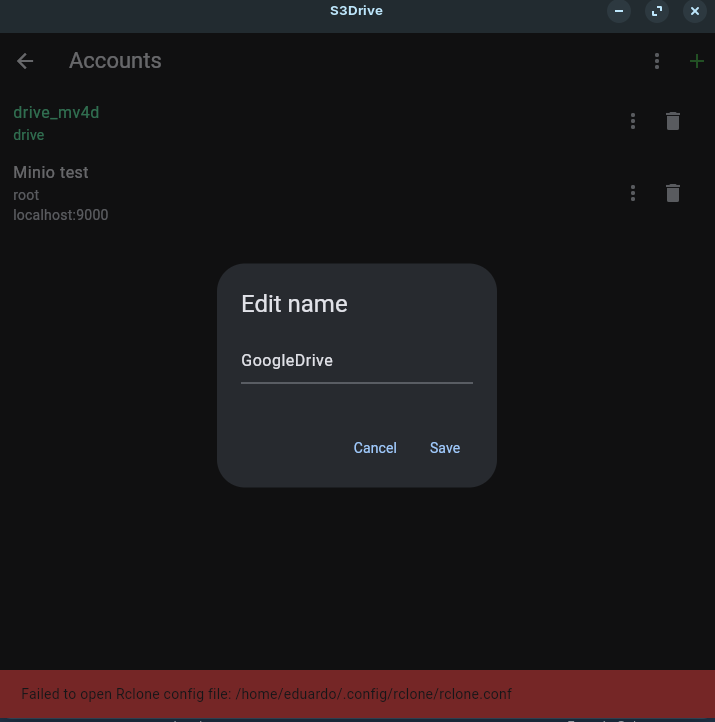
Error message: "Failed to open rclone config file" I'm using linux ZorinOS 18
👍 1
Avatar
Same issue on openSUSE Tumbleweed. In my case, the .../.config/rclone directory doesn't even exist.
Avatar
Thanks for your report. What release do you use? .deb, AppImage or Flathub? By any chance, can you install Rclone (https://rclone.org/install/) and the send output of the: rclone config file command? We make certain assumptions about Rclone path, perhaps it didn't work on your end.


Rclone Installation
Avatar
Hello, I am using the Flathub release. After installing rclone the output is:
❯ rclone config file Configuration file doesn't exist, but rclone will use this path: /home/bakura/.config/rclone/rclone.conf
It created the rclone directory.
9:20 PM
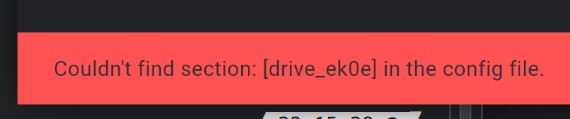
With the directory existing, the error changed to this (when attempting to rename):
Avatar
Thanks for the info. That's quite strange. It seems that when you've configured: drive_ek0e initially through S3Drive it was stored in a different than /home/bakura/.config/rclone/rclone.conf path, because that file didn't exist according to S3Drive rename functionality, as well as rclone config file. When rclone config file created directory, then S3Drive during rename went one step further, but still failed, since in fact rclone.conf which it expected in the .config location was brand new. It seems that the initial Google Drive setup, stored config file in some other location. We need to review Rclone codebase to see where to look elsewhere... there is also chance that Flathub sandboxing somehow kicked in. I will try to give you an update once I have some hints. Thanks! (edited)
Avatar
I searched for the old rclone.conf on my computer but couldn't find it. I'll try again tomorrow using a different method, cause my search program (FSearch) can't find things inside the flatpak directories for some reason. Anyway. Thank you very much for looking into this.
Avatar
Okay, I did look again and found where the config was stored! Apparently this is what flatpak uses as user directory: /home/bakura/.var/app/io.kapsa.drive/config/rclone/rclone.conf Hope this helps.
Avatar
It seems Rclone uses sandboxed path if available and S3Drive was using non-sandboxed path. I couldn't reproduce this issue on Ubuntu 25.10 host, perhaps sandboxing is stricter on other distros. Having said that, we've implemented similar approach that Rclone uses, in our 1.15.9 release, which will appear in a few hours on Flathub (release delay). Alternatively you can install it using this command: flatpak install --user https://dl.flathub.org/build-repo/232693/io.kapsa.drive.flatpakref before it lands on the official website. I would appreciate if you could let me know if that works for you. In principle both Rclone and S3Drive shall pick: /home/<user>/.var/app/io.kapsa.drive/config/rclone/rclone.conf path. In future release we may provide an option where both Rclone and S3Drive could use: /home/<user>/.config/rclone/rclone.conf path. In such case S3Drive could seamlessly load/use Rclone config that's present on user's machine. (edited)
❤️ 1
Avatar
Avatar
Tom
It seems Rclone uses sandboxed path if available and S3Drive was using non-sandboxed path. I couldn't reproduce this issue on Ubuntu 25.10 host, perhaps sandboxing is stricter on other distros. Having said that, we've implemented similar approach that Rclone uses, in our 1.15.9 release, which will appear in a few hours on Flathub (release delay). Alternatively you can install it using this command: flatpak install --user https://dl.flathub.org/build-repo/232693/io.kapsa.drive.flatpakref before it lands on the official website. I would appreciate if you could let me know if that works for you. In principle both Rclone and S3Drive shall pick: /home/<user>/.var/app/io.kapsa.drive/config/rclone/rclone.conf path. In future release we may provide an option where both Rclone and S3Drive could use: /home/<user>/.config/rclone/rclone.conf path. In such case S3Drive could seamlessly load/use Rclone config that's present on user's machine. (edited)

Thanks! I've updated to 15.9 and the path is almost correct now. Just one directory is wrong. This would be the correct path (without the /.config/ directory): /home/bakura/.var/app/io.kapsa.drive/config/rclone/rclone.conf And this is what the program attempted to access:
9:47 PM
It's unfortunate that this can't be reproduced on Ubuntu... I could just make the /.config/ directory myself and move the config file in there and see how it goes? Because if this is the way how flatpak works on Ubuntu, then you should probably keep it this way since Ubuntu is the most popular distro. And doing manual fixes to get stuff to run, is pretty much the burden every Linux user puts on themselves. xD
Avatar
Avatar
Komaeda
It's unfortunate that this can't be reproduced on Ubuntu... I could just make the /.config/ directory myself and move the config file in there and see how it goes? Because if this is the way how flatpak works on Ubuntu, then you should probably keep it this way since Ubuntu is the most popular distro. And doing manual fixes to get stuff to run, is pretty much the burden every Linux user puts on themselves. xD
Hopefully this one will work, please try newest: flatpak install --user https://dl.flathub.org/build-repo/232902/io.kapsa.drive.flatpakref
Because if this is the way how flatpak works on Ubuntu, then you should probably keep it this way since Ubuntu is the most popular distro.
It shouldn't really affect Ubuntu. They way it's implemented, should switch S3Drive to use $XDG_CONFIG_HOME path once provided by the OS and fallback to $HOME if it's not. That's what Rclone does and S3Drive wasn't. For some reason on your OS $XDG_CONFIG_HOME seem to be available, whereas on my end using Flathub on Ubuntu 25.10, Rclone stores config inside: /home/<user>/.config/rclone/rclone.conf, so it seems like $XDG_CONFIG_HOME wasn't passed to it, hence S3Drive will keep using the same path.
👍 1
Avatar
This should now be available in an official Flathub / S3Drive release.
Avatar
Avatar
Tom
This should now be available in an official Flathub / S3Drive release.
It works now. Thank you very much!
👍 1
Exported 14 message(s)
Timezone: UTC+0