
S3Drive
Community / support / Backblaze - Issues with Trash, Versioning & Sync


 I hope this fix will also solve following issues with versioning I ran into.
When I use tasks in Sync tab to sync files, it often happens that the same version of a file is uploaded multiple times. The file then ends up with several versions, one after another, containing identical content. This happens on Android. I haven’t seen the same behavior on Windows yet.
Yesterday, I noticed that one of my tasks correctly deleted hundreds of files, but when I tried to permanently delete them from the Trash, I got an error. As a result, the files got stuck in the bucket.
When this happens, the files have to be deleted manually (unless a bucket lifecycle policy is set up), because they are no longer shown in Trash in S3Drive. Unfortunately, the logs don’t say much, as I didn’t have debug logging enabled.
I hope this fix will also solve following issues with versioning I ran into.
When I use tasks in Sync tab to sync files, it often happens that the same version of a file is uploaded multiple times. The file then ends up with several versions, one after another, containing identical content. This happens on Android. I haven’t seen the same behavior on Windows yet.
Yesterday, I noticed that one of my tasks correctly deleted hundreds of files, but when I tried to permanently delete them from the Trash, I got an error. As a result, the files got stuck in the bucket.
When this happens, the files have to be deleted manually (unless a bucket lifecycle policy is set up), because they are no longer shown in Trash in S3Drive. Unfortunately, the logs don’t say much, as I didn’t have debug logging enabled.
#2857 Failed: Error: Deleting 470 out of 1750 object versions has failed. Check logs for more details.
#2858 Error prompt: Failed: Error: Deleting 470 out of 1750 object versions has failed. Check logs for more details.
#2859 DeleteObjects with Errors: <?xml version="1.0" encoding="UTF-8" standalone="yes"?>
<DeleteResult xmlns="http://s3.amazonaws.com/doc/2006-03-01/">
    <Error>
        <Code>InternalError</Code>
        <Key>REDACTED</Key>
        <Message>We encountered an internal error. Please try again.</Message>
        <VersionId>REDACTED</VersionId>
    </Error>
...
Thanks again for looking into this. I hope this fix will also solve following issues with versioning I ran into.
When I use tasks in Sync tab to sync files, it often happens that the same version of a file is uploaded multiple times. The file then ends up with several versions, one after another, containing identical content. This happens on Android. I haven’t seen the same behavior on Windows yet.
Yesterday, I noticed that one of my tasks correctly deleted hundreds of files, but when I tried to permanently delete them from the Trash, I got an error. As a result, the files got stuck in the bucket.
When this happens, the files have to be deleted manually (unless a bucket lifecycle policy is set up), because they are no longer shown in Trash in S3Drive. Unfortunately, the logs don’t say much, as I didn’t have debug logging enabled.
#2857 Failed: Error: Deleting 470 out of 1750 object versions has failed. Check logs for more details.
#2858 Error prompt: Failed: Error: Deleting 470 out of 1750 object versions has failed. Check logs for more details.
#2859 DeleteObjects with Errors: <?xml version="1.0" encoding="UTF-8" standalone="yes"?>
<DeleteResult xmlns="http://s3.amazonaws.com/doc/2006-03-01/">
    <Error>
        <Code>InternalError</Code>
        <Key>REDACTED</Key>
        <Message>We encountered an internal error. Please try again.</Message>
        <VersionId>REDACTED</VersionId>
    </Error>
...
Thanks again for looking into this. I hope this fix will also solve following issues with versioning I ran into.
When I use tasks in Sync tab to sync files, it often happens that the same version of a file is uploaded multiple times. The file then ends up with several versions, one after another, containing identical content. This happens on Android. I haven’t seen the same behavior on Windows yet.
Yesterday, I noticed that one of my tasks correctly deleted hundreds of files, but when I tried to permanently delete them from the Trash, I got an error. As a result, the files got stuck in the bucket.
When this happens, the files have to be deleted manually (unless a bucket lifecycle policy is set up), because they are no longer shown in Trash in S3Drive. Unfortunately, the logs don’t say much, as I didn’t have debug logging enabled.
#2857 Failed: Error: Deleting 470 out of 1750 object versions has failed. Check logs for more details.
#2858 Error prompt: Failed: Error: Deleting 470 out of 1750 object versions has failed. Check logs for more details.
#2859 DeleteObjects with Errors: <?xml version="1.0" encoding="UTF-8" standalone="yes"?>
<DeleteResult xmlns="http://s3.amazonaws.com/doc/2006-03-01/">
    <Error>
        <Code>InternalError</Code>
        <Key>REDACTED</Key>
        <Message>We encountered an internal error. Please try again.</Message>
        <VersionId>REDACTED</VersionId>
    </Error>
...
Thanks again for looking into this.  1
1 1
1 However, similar to what I mentioned above regarding sync, when you restore a file from Trash, its latest non-zero-byte version is duplicated.
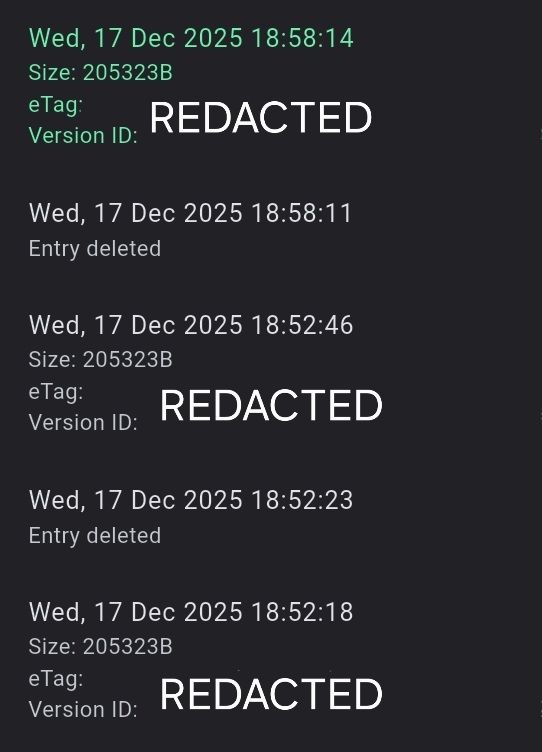 However, similar to what I mentioned above regarding sync, when you restore a file from Trash, its latest non-zero-byte version is duplicated.
  1
1