Guild icon
S3Drive
Community / support / [Android] [iOS] How to specify a folder on an SMB drive

Avatar
How do I specify an ini file to specify a folder when connecting to a local SMB? I want to open the folder //SMB_DriveName/MyDocument. I searched the web for information but couldn't find anything. I can connect to the SMB drive and the root directory is displayed.
Avatar
Off the office ATM. Not sure if that’s possible with SMB configuration, but you could create an alias configuration. It’s Rclone specific remote which allows you to point to a specific location.
Avatar
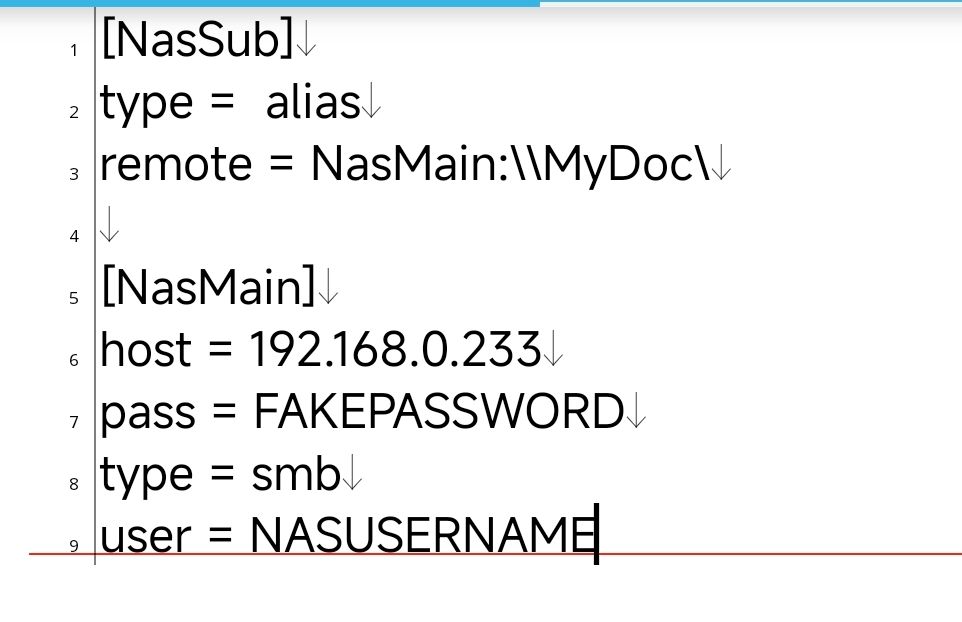
When I write the ".ini" file like this and open NasSub, I get a "Directory not found" error message, even though the folder is definitely there. I also tried "root_directory = \MyDoc", but it didn't work.
Avatar
Hi @Star Maakun, Have you tried NasMain:MyDoc instead?
8:12 AM
For instance this worked for me: [samba] type = smb host = 127.0.0.1 pass = password [samba_alias] type = alias remote = samba:sambashare I can either: rclone ls samba_alias: or rclone ls samba:sambashare without alias.
Avatar
I did it! I did it! I'm so grateful. Thank you!😊
👍 1
Exported 6 message(s)
Timezone: UTC+0