Guild icon
S3Drive
Community / general
For all on-topic discussion about S3Drive or related storage providers.

tonyb joined the server. 12/11/2025 8:44 AM
tonyb joined the server. 12/11/2025 11:07 AM
Karl joined the server. 12/12/2025 7:49 AM
BrattyBarkzzz joined the server. 12/15/2025 6:50 AM
Chemical Datas joined the server. 12/15/2025 8:02 PM
acarlsen joined the server. 12/16/2025 12:27 PM
ajo joined the server. 12/18/2025 8:57 AM
WebArtisan254 joined the server. 12/18/2025 5:26 PM
tonyb joined the server. 12/19/2025 2:25 PM
Bohdan Zhuravel joined the server. 12/20/2025 12:12 PM
Osañãl Rain Al NYM-5182 joined the server. 12/21/2025 3:10 AM
Avatar
Avatar
Osañãl Rain Al NYM-5182
Click to see original message
Osañãl Rain Al NYM-5182 12/21/2025 3:11 AM
Deleted User joined the server. 12/21/2025 12:29 PM
koalia joined the server. 12/21/2025 12:47 PM
Serow joined the server. 12/22/2025 2:08 AM
dvd joined the server. 12/22/2025 5:33 PM
Floh joined the server. 12/23/2025 1:11 AM
danielwe joined the server. 12/23/2025 1:58 AM
DrInvincibilis joined the server. 12/23/2025 9:07 PM
ed joined the server. 12/24/2025 2:17 AM
Avatar
Avatar
ed
Click to see original message
sd joined the server. 12/24/2025 9:28 PM
Josh G joined the server. 12/25/2025 1:02 AM
pnk1 joined the server. 12/25/2025 7:56 AM
Alek joined the server. 12/26/2025 11:57 AM
adaltee joined the server. 12/26/2025 4:54 PM
CrazyCoderX joined the server. 12/26/2025 5:12 PM
NCryptsion (加密) joined the server. 12/27/2025 12:05 PM
speedrun14 joined the server. 12/29/2025 5:30 AM
Mikkel#7341 joined the server. 12/29/2025 12:26 PM
Justin 🩺 joined the server. 12/30/2025 2:25 AM
Joefficial joined the server. 12/30/2025 9:42 PM
Avatar
Is there any way to prevent the app from closing when you hit the back button from the root of a account/bucket? It's quite annoying. Instead I would expect it to go back to the accounts list. Not minimize/close the whole app. If there's no way, maybe a feature request for the following:
  • Navigation options for Account/Bucket root navigation back button
    • Optional toggles to either do the following:
      • Close the app
      • Go back to accounts list
      • Do nothing, stay at root folder
(edited)
Avatar
Avatar
Aristorn
Is there any way to prevent the app from closing when you hit the back button from the root of a account/bucket? It's quite annoying. Instead I would expect it to go back to the accounts list. Not minimize/close the whole app. If there's no way, maybe a feature request for the following:
  • Navigation options for Account/Bucket root navigation back button
    • Optional toggles to either do the following:
      • Close the app
      • Go back to accounts list
      • Do nothing, stay at root folder
(edited)
Hi, what’s platform/OS you refer to?
Avatar
Avatar
Tom
Hi, what’s platform/OS you refer to?
android app
Avatar
Avatar
Aristorn
Is there any way to prevent the app from closing when you hit the back button from the root of a account/bucket? It's quite annoying. Instead I would expect it to go back to the accounts list. Not minimize/close the whole app. If there's no way, maybe a feature request for the following:
  • Navigation options for Account/Bucket root navigation back button
    • Optional toggles to either do the following:
      • Close the app
      • Go back to accounts list
      • Do nothing, stay at root folder
(edited)
I think it's something we can implement. I think the simplest and most straightforward would simply be to show prompt asking user whether to close the app or not. Would that work for you? In my opinion having more options might unnecessarily confuse user as to what should they choose given so many options.
Avatar
Avatar
Tom
I think it's something we can implement. I think the simplest and most straightforward would simply be to show prompt asking user whether to close the app or not. Would that work for you? In my opinion having more options might unnecessarily confuse user as to what should they choose given so many options.
I guess why even bother closing the app (it's a back button - not a close app button)? I'd be satisfied with it just not even prompting and just staying at the directory root. (edited)
☾⛧ 𝚃𝚒𝚏𝚏𝚒𝚎 ! ⛧☽ (she/fae) joined the server. 12/31/2025 3:33 PM
Avatar
☾⛧ 𝚃𝚒𝚏𝚏𝚒𝚎 ! ⛧☽ (she/fae) 12/31/2025 3:35 PM
helloooo
3:36 PM
Is there any difference between using the dedicated media backup mechanic and manually setting up a sync for \DCIM, \Pictures and \Movies?
3:39 PM
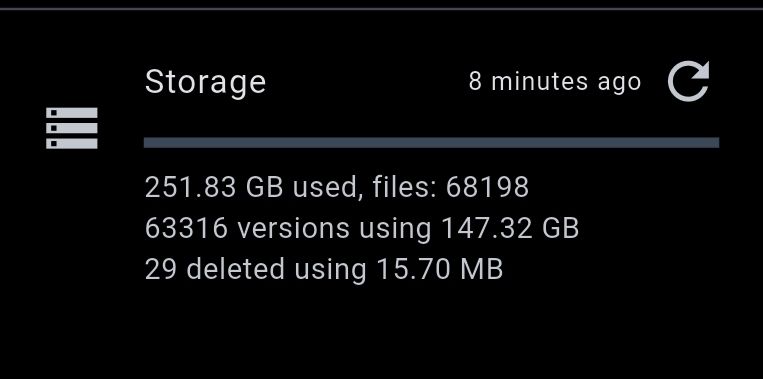
And could I perhaps get some clarification on what these figures mean? My phone storage is 256GB (displays as 224) and the folders I'm syncing should in theory be about 139.3 GB so I'm confused on where the 251 and 147 could be coming from (especially given that although other folders are done, DCIM is still doing it's first run to full)
3:40 PM
(Android, newest app version, Ultimate, "copy" method from local into Backblaze B2) (edited)
TheSteve0 joined the server. 12/31/2025 9:08 PM
Avatar
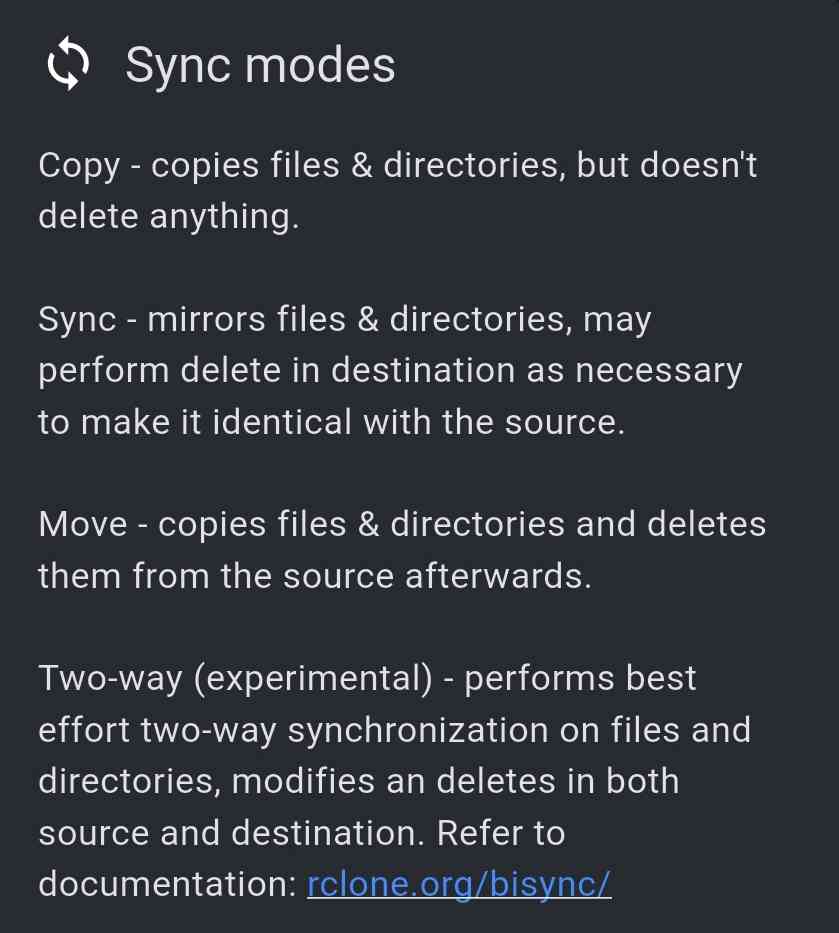
I am trying to find doc on syncing behavior but can't seem to find anyway. Is it just a listing by default with nothing copied to the local machine? If I wanted to have a two way sync between a cloud and local directory where the latest files exist in both locations, how would I acheive that in the GUI or in a config file?
9:41 PM
And is the doc in github if we want to contribute to teh doc?
Avatar
Is there a way to change the mount name or location? I see that if I change the connection name that becomes reflected in the mount but it always seems to be ~/s3drive_<connection_name>. What if I want it to be in ~/mount/<connection_name>? I looked in ~/.var/app/io.kapsa.drive/ for conf files that might let me control this. I assume that since I am using the flatpak (THANKS FOR MAKING THIS - ONE OF THE REASONS I PURCHASED!) that the conf files should be there
Avatar
Looks like onedrive business or personal is working either
Avatar
Avatar
TheSteve0
Looks like onedrive business or personal is working either
scatterbrain joined the server. 1/1/2026 6:50 AM
Avatar
Avatar
TheSteve0
Looks like onedrive business or personal is working either
Does for me
m3Lith joined the server. 1/1/2026 3:18 PM
arpot joined the server. 1/2/2026 12:27 AM
Avatar
Avatar
TheSteve0
I am trying to find doc on syncing behavior but can't seem to find anyway. Is it just a listing by default with nothing copied to the local machine? If I wanted to have a two way sync between a cloud and local directory where the latest files exist in both locations, how would I acheive that in the GUI or in a config file?
☾⛧ 𝚃𝚒𝚏𝚏𝚒𝚎 ! ⛧☽ (she/fae) 1/2/2026 4:49 PM
The Android app has a ✏️ button in the Sync section, there should be something similar in the desktop and Web apps?
4:50 PM
The one you presumably want is Two Way which afaik uses the Rclone documentation as its basis
Avatar
☾⛧ 𝚃𝚒𝚏𝚏𝚒𝚎 ! ⛧☽ (she/fae) 1/2/2026 5:12 PM
although for what you're doing I personally would try doing Syncthing or a similar solution between the devices, and then S3Drive from a central device that's always connected to broadband
GoingDutchman joined the server. 1/3/2026 10:57 AM
Avatar
GoingDutchman 1/3/2026 12:17 PM
Hi. I have a Proton Drive and I am running Linux (Ubuntu 25.10). Digging into how to sync proton drive locally, I found S3Drive. A question: is S3Drive app capable of syncing Proton Drive? Does this work? I see Proton Drive is offered as a provider, so I assume: yes, it works 🤔 (edited)
Avatar
GoingDutchman 1/3/2026 1:25 PM
So it seems Proton Drive is currently not working with S3 app (error 422, issue outside S3App, it's between rclone<>ProtonDrive). Right? (PS. That's no problem, just that I know it and not putting time into investigations). (edited)
DeusDe joined the server. 1/3/2026 5:38 PM
Avatar
Avatar
GoingDutchman
Hi. I have a Proton Drive and I am running Linux (Ubuntu 25.10). Digging into how to sync proton drive locally, I found S3Drive. A question: is S3Drive app capable of syncing Proton Drive? Does this work? I see Proton Drive is offered as a provider, so I assume: yes, it works 🤔 (edited)
Hey, i also want to sync my Proton Drive. I just installed S3Drive with flatpak and it works, maybe give it a try, if not already done.
Avatar
Avatar
DeusDe
Hey, i also want to sync my Proton Drive. I just installed S3Drive with flatpak and it works, maybe give it a try, if not already done.
GoingDutchman 1/3/2026 7:29 PM
Hi. Thx for the tip. Was using AppImage, switched to flatpak, but got the same results. To be more specific: Sync from Proton Drive to local is working fine. Sync from local to Proton Drive does nothing. Dragging a local file (thats not on Proton yet) into the S3Drive app gives a code 200501 and status 422. A retry of this attempt gives a long response string, a failed with code 2501, status 422. Last part of the response: "File or folder not found". So yeah, the exact same result.
7:30 PM
Are you only down-syncing from Proton to local? That works for me. The other way around -to Proton- completely not. (edited)
7:32 PM
Dragging a file in S3App, thats not in Proton, gives: "2026/01/03 20:26:50.048455 ERROR RESTY 422 GET https://mail.proton.me/api/drive/shares/blablablasomelongstring==/files/blablablanotherlongstring==/revisions: File or folder not found (Code=2501, Status=422)" (edited)
7:32 PM
I'll stop here, is more suited for support channel I guess. (edited)
!Marino joined the server. 1/4/2026 4:48 PM
TG joined the server. 1/5/2026 2:41 AM
pS joined the server. 1/5/2026 9:57 AM
Avatar
Hi all. I am a newbie here and trying to understand the app. I have an existing external S3 storage and would like to use it via rclone on multiple Android devices. I am thinking of "Ultimate" license. Question is: If I import rclone config in my Android app, or create an S3 connection on the web, where are my credentials stored?
Jerryl Danks ䷦ joined the server. 1/5/2026 11:52 AM
louis444 joined the server. 1/5/2026 5:35 PM
Avatar
Avatar
pS
Hi all. I am a newbie here and trying to understand the app. I have an existing external S3 storage and would like to use it via rclone on multiple Android devices. I am thinking of "Ultimate" license. Question is: If I import rclone config in my Android app, or create an S3 connection on the web, where are my credentials stored?
Hi! Your credentials are stored securely on your device using platform-dependent OS tools, e.g. Keychain on macOS/iOS, DPAPI on Windows, Keyring on Linux, Keystore on Android. In some cases your credentials are stored in these locations, in some cases your credentials are stored encrypted, but encryption key is stored in these secure location. Please be aware the Rclone credentials are stored as a local file, this isn't inherently insecure and that's how Rclone stores credentials, but in order to improve security we're working on config encryption: https://s3drive.canny.io/feature-requests/p/rclone-encrypted-config Tl;dr Credentials are stored locally, encrypted on your device. No credentials are stored externally or shared with some servers / 3rd party. (edited)
Add support for encrypted Rclone config: https://rclone.org/docs/#configuration-encryption On some OSs there isn't enough isolation between apps, meaning that
Avatar
Avatar
☾⛧ 𝚃𝚒𝚏𝚏𝚒𝚎 ! ⛧☽ (she/fae)
And could I perhaps get some clarification on what these figures mean? My phone storage is 256GB (displays as 224) and the folders I'm syncing should in theory be about 139.3 GB so I'm confused on where the 251 and 147 could be coming from (especially given that although other folders are done, DCIM is still doing it's first run to full)
Hi, fair question to ask. By default S3 has versioning enabled, so any time your file changes and get synced again, new file revision is created. The old one is still restorable and stored as a version. In your case 251.83GB is total size used, out of which 147.32GB are past revisions. If you substract these two you should in theory get size of a current dataset. You can delete all past revisions (and free up some cloud space) if you don't need any historical versions. You can do so in the Profile settings. Given your data set size it might take up to couple minutes though.
Avatar
Avatar
Tom
Hi, fair question to ask. By default S3 has versioning enabled, so any time your file changes and get synced again, new file revision is created. The old one is still restorable and stored as a version. In your case 251.83GB is total size used, out of which 147.32GB are past revisions. If you substract these two you should in theory get size of a current dataset. You can delete all past revisions (and free up some cloud space) if you don't need any historical versions. You can do so in the Profile settings. Given your data set size it might take up to couple minutes though.
☾⛧ 𝚃𝚒𝚏𝚏𝚒𝚎 ! ⛧☽ (she/fae) 1/6/2026 8:50 AM
This is what I assumed, although I'm confused on what it considers a "version" here. This was my first full sync (it took ages to finish, unsurprisingly) so what's making it consider these files as versions when they're being uploaded for the first time?
Avatar
Avatar
TheSteve0
Is there a way to change the mount name or location? I see that if I change the connection name that becomes reflected in the mount but it always seems to be ~/s3drive_<connection_name>. What if I want it to be in ~/mount/<connection_name>? I looked in ~/.var/app/io.kapsa.drive/ for conf files that might let me control this. I assume that since I am using the flatpak (THANKS FOR MAKING THIS - ONE OF THE REASONS I PURCHASED!) that the conf files should be there
Not at the moment, but we'll add that as a feature request. We've added s3drive_ prefix mostly to avoid any confusions or name collisions with other potential mounts, but perhaps it's not required for a custom name though. ... so the plan would be to append: s3drive_ by default, but if custom name is used, it would be used directly as a mount name. In theory we could add additional custom param, but that's something we'll consider if suggested solution doesn't work.
Avatar
Avatar
TheSteve0
Click to see attachment 🖼️
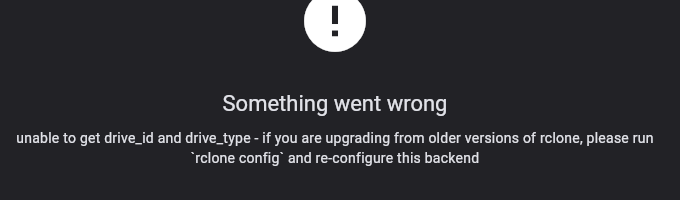
On what platform are you getting this error? OneDrive has lots of gotchas depending on the account type. You can try connecting to OneDrive using: rclone config command on your desktop. Rclone installation will be required prior to that: https://rclone.org/install/ Once you're done, config will be automatically visible on desktop. You can also export this config and import to other device, mobile or other PC.
Rclone Installation
Avatar
Avatar
☾⛧ 𝚃𝚒𝚏𝚏𝚒𝚎 ! ⛧☽ (she/fae)
This is what I assumed, although I'm confused on what it considers a "version" here. This was my first full sync (it took ages to finish, unsurprisingly) so what's making it consider these files as versions when they're being uploaded for the first time?
Is that external S3 or S3Drive storage? In most cases if more than one version is created it indicates that sync process couldn't verify whether upload was correct and retried upload. This happens due to many reasons, one of them is lack of read-consistency (file is available for read-verification with some delay after upload, so rclone thinks it needs retry, but when dust settles versions are duplicated). Read-consistency shouldn't be an issue with most providers nowadays though.
Avatar
Avatar
Tom
Is that external S3 or S3Drive storage? In most cases if more than one version is created it indicates that sync process couldn't verify whether upload was correct and retried upload. This happens due to many reasons, one of them is lack of read-consistency (file is available for read-verification with some delay after upload, so rclone thinks it needs retry, but when dust settles versions are duplicated). Read-consistency shouldn't be an issue with most providers nowadays though.
☾⛧ 𝚃𝚒𝚏𝚏𝚒𝚎 ! ⛧☽ (she/fae) 1/6/2026 8:58 AM
Backblaze B2, I assumed S3D would be looking at file mod dates or CRC/SHA hashes to check if the file has changed though. It seems to have done a full backup but almost 3x times over on the DCIM folder for some reason
Avatar
Avatar
☾⛧ 𝚃𝚒𝚏𝚏𝚒𝚎 ! ⛧☽ (she/fae)
Backblaze B2, I assumed S3D would be looking at file mod dates or CRC/SHA hashes to check if the file has changed though. It seems to have done a full backup but almost 3x times over on the DCIM folder for some reason
Did you use Sync or Copy mode? Was DCIM also uploaded using S3Drive sync tool or perhaps Media Backup?
Avatar
☾⛧ 𝚃𝚒𝚏𝚏𝚒𝚎 ! ⛧☽ (she/fae) 1/6/2026 9:00 AM
Copy using the Sync menu
9:01 AM
I would've used Media Backup probably but it makes you select every album for some reason (for me that's 200+ folders that might increase at any time)
Avatar
Avatar
☾⛧ 𝚃𝚒𝚏𝚏𝚒𝚎 ! ⛧☽ (she/fae)
Backblaze B2, I assumed S3D would be looking at file mod dates or CRC/SHA hashes to check if the file has changed though. It seems to have done a full backup but almost 3x times over on the DCIM folder for some reason
In principle that's what it does, chances are there was some issue on the Backblaze B2 which made Rclone think file needs reupload. Potential solutions would be to disable read verification during initial first sync and then run resync with verification enabled. (Not possible from S3Drive though, possible with Rclone CLI). Chances are that Backblaze B2 works better with native integration than S3, so possible solution would be to set it up as native B2 (not S3) using Rclone (https://rclone.org/b2/) and then import this config to S3Drive on the Accounts page. Another approach is to disable versions on Backblaze bucket level. One more approach is to set up lifetime policies to e.g. delete versions older than x days to automatically clean up mess that was created.
Avatar
Avatar
Tom
In principle that's what it does, chances are there was some issue on the Backblaze B2 which made Rclone think file needs reupload. Potential solutions would be to disable read verification during initial first sync and then run resync with verification enabled. (Not possible from S3Drive though, possible with Rclone CLI). Chances are that Backblaze B2 works better with native integration than S3, so possible solution would be to set it up as native B2 (not S3) using Rclone (https://rclone.org/b2/) and then import this config to S3Drive on the Accounts page. Another approach is to disable versions on Backblaze bucket level. One more approach is to set up lifetime policies to e.g. delete versions older than x days to automatically clean up mess that was created.
☾⛧ 𝚃𝚒𝚏𝚏𝚒𝚎 ! ⛧☽ (she/fae) 1/6/2026 2:04 PM
I think easiest approach for me is just disable versioning for now, it seems to only be a problem with initial syncs of very large folders ... ? DCIM for me is a 130 GB folder locally. It seems to stop every now and then as if it was being killed in the background or something so maybe that's what's causing the duplicates
2:06 PM
As I mentioned I would've used the media backup tool but unfortunately no "Select all" button, I don't think selecting every folder manually is a great UI choice here. That entire screen is a bit funky because it makes you scroll sideways even though you'd assume it was a vertical grid...
Avatar
☾⛧ 𝚃𝚒𝚏𝚏𝚒𝚎 ! ⛧☽ (she/fae) 1/6/2026 2:57 PM
Also unrelated, but - is it possible to grant S3D superuser permissions? I'm willing to grant them but the File Picker dialogue still takes issue with me wanting to choose "risky" folders like /sdcard/ or /sdcard/Downloads/ and /sdcard/Android/
Avatar
Avatar
☾⛧ 𝚃𝚒𝚏𝚏𝚒𝚎 ! ⛧☽ (she/fae)
Also unrelated, but - is it possible to grant S3D superuser permissions? I'm willing to grant them but the File Picker dialogue still takes issue with me wanting to choose "risky" folders like /sdcard/ or /sdcard/Downloads/ and /sdcard/Android/
Yes, if you use Upload files/folders functionality, then it asks for a different permission set than standard Upload files or Upload folders and then allows you to select different paths. The breadcrumb selector: "Files" should allow you to choose e.g. SDCard or USB device if it's available for your device. It's a new feature released in December 2025.
Avatar
Avatar
Tom
Yes, if you use Upload files/folders functionality, then it asks for a different permission set than standard Upload files or Upload folders and then allows you to select different paths. The breadcrumb selector: "Files" should allow you to choose e.g. SDCard or USB device if it's available for your device. It's a new feature released in December 2025.
☾⛧ 𝚃𝚒𝚏𝚏𝚒𝚎 ! ⛧☽ (she/fae) 1/6/2026 4:44 PM
Noted, wasn't aware there was a difference - I think the naming here is really confusing, lol
Avatar
Avatar
☾⛧ 𝚃𝚒𝚏𝚏𝚒𝚎 ! ⛧☽ (she/fae)
Noted, wasn't aware there was a difference - I think the naming here is really confusing, lol
Yes, we're still pending 1.16.2 release where in fact it's default way to upload files/folders, whereas the previous options can be enabled in the settings (especially useful for users not wanting to give app full files permissions). (edited)
Avatar
☾⛧ 𝚃𝚒𝚏𝚏𝚒𝚎 ! ⛧☽ (she/fae) 1/6/2026 4:45 PM
Is it possible to sync a root-level directory like /data/adb/ or /vendor_boot/?
4:46 PM
Since I think the Files picker doesn't even have a coded in UI method to access anything above /sdcard/
4:47 PM
Obviously would be a one way copy, no chance am I syncing that bidirectionally... 🤣
Avatar
Avatar
☾⛧ 𝚃𝚒𝚏𝚏𝚒𝚎 ! ⛧☽ (she/fae)
Is it possible to sync a root-level directory like /data/adb/ or /vendor_boot/?
I don't think so, but it's possible to sync directories at the root level like Downloads and others not accessible via standard picker.
Avatar
Avatar
☾⛧ 𝚃𝚒𝚏𝚏𝚒𝚎 ! ⛧☽ (she/fae)
Obviously would be a one way copy, no chance am I syncing that bidirectionally... 🤣
I don't think that access to these folders is possible on non-rooted devices. <--- not 100% sure though (edited)
Avatar
☾⛧ 𝚃𝚒𝚏𝚏𝚒𝚎 ! ⛧☽ (she/fae) 1/6/2026 4:48 PM
I am rooted, although I don't know if S3Drive is capable of understanding how to make use of superuser
4:50 PM
I don't assume it's been a concern in terms of user needs so far lol
Avatar
Avatar
☾⛧ 𝚃𝚒𝚏𝚏𝚒𝚎 ! ⛧☽ (she/fae)
I am rooted, although I don't know if S3Drive is capable of understanding how to make use of superuser
We've never tried to be honest. We do allow to select: "Custom path" (manually typed) in the Sync tool which we've removed in the yet unreleased 1.16.2 in favor of the new file picker. Perhaps you can try using that: "Custom path" and see if you can copy these folders out of your device using Sync, if that works, then we will keep: "Custom path" feature or provide some buttons to preselect some "common" paths.
Avatar
☾⛧ 𝚃𝚒𝚏𝚏𝚒𝚎 ! ⛧☽ (she/fae) 1/6/2026 4:52 PM
Not a big deal for me but would be useful for dumping KernelSU modules and their configs + backing up my firmware and boot images
Avatar
Avatar
Tom
We've never tried to be honest. We do allow to select: "Custom path" (manually typed) in the Sync tool which we've removed in the yet unreleased 1.16.2 in favor of the new file picker. Perhaps you can try using that: "Custom path" and see if you can copy these folders out of your device using Sync, if that works, then we will keep: "Custom path" feature or provide some buttons to preselect some "common" paths.
☾⛧ 𝚃𝚒𝚏𝚏𝚒𝚎 ! ⛧☽ (she/fae) 1/6/2026 4:53 PM
Will let you know shortly - I feel like this app targets a crowd that overlaps a lot with custom ROM type people so would be a useful thing to know works
4:54 PM
Very good app on most fronts by the way, thank you for maintaining it! Found it through a very old Reddit thread for "PhotoSync" and it seems to be the best option on the market for this kinda thing. I pay for very few subscriptions but S3D is currently one of them :)
❤️ 1
Avatar
Avatar
☾⛧ 𝚃𝚒𝚏𝚏𝚒𝚎 ! ⛧☽ (she/fae)
Very good app on most fronts by the way, thank you for maintaining it! Found it through a very old Reddit thread for "PhotoSync" and it seems to be the best option on the market for this kinda thing. I pay for very few subscriptions but S3D is currently one of them :)
Thanks for these kind words and interesting to see how "long tail" of our old posts still seem to bring new people to our app!
Avatar
Avatar
Tom
Thanks for these kind words and interesting to see how "long tail" of our old posts still seem to bring new people to our app!
☾⛧ 𝚃𝚒𝚏𝚏𝚒𝚎 ! ⛧☽ (she/fae) 1/6/2026 4:57 PM
I noticed how active you are in responding to queries about the app on Reddit + how much you seem to listen to the user base in terms of features and stuff and that kind of thing is rare :)
Exported 100 message(s)
Timezone: UTC+0