Guild icon
S3Drive
Community / general
For all on-topic discussion about S3Drive or related storage providers.

peepo joined the server. 11/2/2025 11:12 PM
D∆VID joined the server. 11/2/2025 11:38 PM
Avatar
Hi, new to s3drive but love the product just have a question regarding storage. I exceeded my free 12gb storage and I upgraded to the ultimate version for the 150gb but my storage has stayed the same, might be a newbie question but I'd like some advice.
Avatar
Avatar
D∆VID
Hi, new to s3drive but love the product just have a question regarding storage. I exceeded my free 12gb storage and I upgraded to the ultimate version for the 150gb but my storage has stayed the same, might be a newbie question but I'd like some advice.
Hi, Thanks for your purchase. Did you buy Ultimate plan https://s3drive.app/pricing or 120GB Storage plan https://s3drive.app/pricing?q=storage ? Ultimate doesn't increase the quota for 12GB account, but allows you to unlock all app features to be used with external storage. On the other hand if you've bought 120GB plan and your storage allocation hasn't increased after a minute or two, then certainly something went wrong. In such case I would appreciate if you send me your e-mail over DM or send us a quick to: support@s3drive.app Thanks! (edited)
Avatar
Avatar
Tom
In our latest release we've updated Rclone to newest version and then fixed "Bad state: Flutter Local Notifications must be initialized before use" issue (https://github.com/s3drive/app/issues/74). Whilst this may not necessarily address crash issue, it's worth trying before we can troubleshoot this further. Newest release: https://github.com/s3drive/windows-app/releases (edited)
Hi, tried with the 1.15.5 + 3 but the crash persist
Avatar
Avatar
zvan_fox
Hi, tried with the 1.15.5 + 3 but the crash persist
By any chance can you try running sync manually, outside S3Drive? rclone sync from:srcFolder to:dstFolder and see whether it crashes? You need rclone binary, on Windows that would likely be: https://downloads.rclone.org/v1.71.2/rclone-v1.71.2-windows-amd64.zip (edited)
👍 1
Avatar
@Tom the use of "xxx" is for anonimity and the file he is pointing out as "transferringpanic" is a Proton Doc file, maybe this is the issue. (edited)
Avatar
Ok, I tried deleting the Proton Doc file and it worked! Thank you for helping me out debugging this error 🙂
Avatar
Avatar
zvan_fox
Ok, I tried deleting the Proton Doc file and it worked! Thank you for helping me out debugging this error 🙂
Thanks for this, quite useful to know. If you feel like it, you can report it here: https://github.com/henrybear327/Proton-API-Bridge/issues perhaps some open-source contributor can pick it up and dedicate some time to it. We’d be happy to spend some time exploring this further if Proton is open to providing some official support for external integrations. At the moment, there are other priorities for us, especially since we’re not sure about Proton’s plans regarding Rclone support. (edited)
Avatar
Avatar
Tom
Thanks for this, quite useful to know. If you feel like it, you can report it here: https://github.com/henrybear327/Proton-API-Bridge/issues perhaps some open-source contributor can pick it up and dedicate some time to it. We’d be happy to spend some time exploring this further if Proton is open to providing some official support for external integrations. At the moment, there are other priorities for us, especially since we’re not sure about Proton’s plans regarding Rclone support. (edited)
Done 🙌
👍 1
Avatar
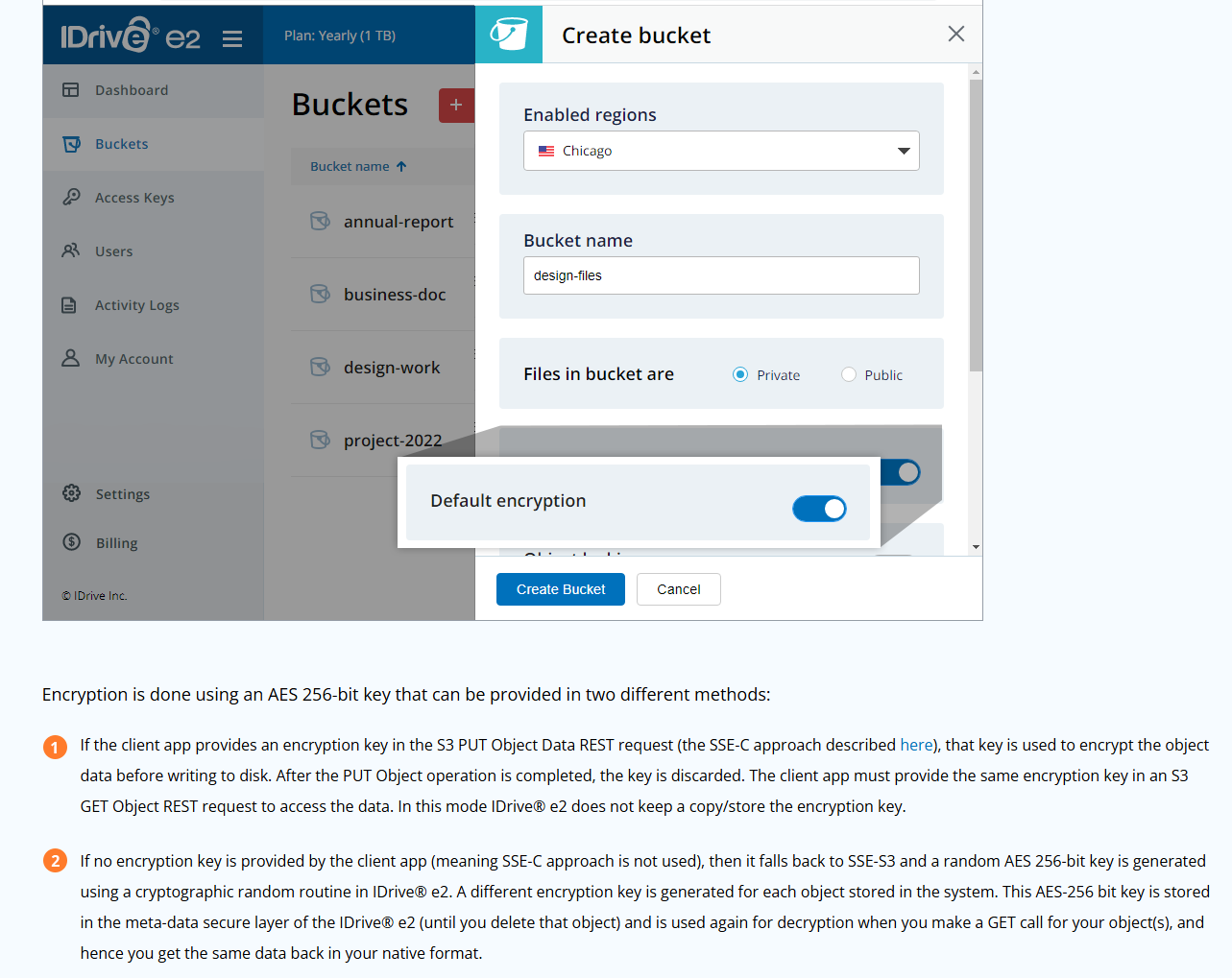
Hi, im wondering about the encryption method to use. If I have default encryption ON on iDrive e2 bucket, is it enough? or should I also enable E2E encryption on S3Drive as well ? thanks
Avatar
Avatar
BenX
Hi, im wondering about the encryption method to use. If I have default encryption ON on iDrive e2 bucket, is it enough? or should I also enable E2E encryption on S3Drive as well ? thanks
Hi, we've mentioned that in our FAQ: https://s3drive.app/faq
Shall I enable SSE (Server-side encryption)? Many S3 providers support Server-side encryption. SSE alone isn't sufficient factor to protect your privacy, however in most cases it takes one click to enable it, it's free and doesn't come with any performance penalty for you as a customer... so the answer is YES. Don't forget to enable the S3Drive's client-side encryption though, as this is the decisive factor in protecting your privacy... and hey it's free.
SSE doesn't protect your privacy, as provider can still view the data, but it protects your data when someone physically access datacenter and steals some hard drives.
Easily transform any S3, WebDAV or Rclone compatible back-end into your personal encrypted file storage. Drive mount, Sync, Backup, File Versioning, Search. Preview different file formats (pdf, markdown, txt, audio, video)
👍 1
Avatar
Avatar
BenX
Hi, im wondering about the encryption method to use. If I have default encryption ON on iDrive e2 bucket, is it enough? or should I also enable E2E encryption on S3Drive as well ? thanks
I've just reminded myself that iDrive E2 specifically has some weird way of reporting ETag (object's hashes) when SSE is enabled and this isn't a standard way across providers. For instance Sync or other operations might rely on other less ideal methods (size, modification date) of verifying whether objects has changed. More on that in a previous post: https://discord.com/channels/1069654792902815845/1069654792902815848/1081247124580204574 If you plan enabling S3Drive's / Rclone's E2E encryption then I would probably keep server side encryption disabled for iDrive, unless you're happy to experiment with it a bit.
Avatar
Avatar
zvan_fox
Done 🙌
Thanks. Nice, clean, bug report. Well done! (edited)
🙏 1
\🪹🪸 joined the server. 11/4/2025 4:24 PM
Eduardo joined the server. 11/4/2025 6:17 PM
Namex joined the server. 11/7/2025 6:49 PM
Avatar
Avatar
Namex
Click to see original message
FanComprehensive7898 joined the server. 11/9/2025 11:56 AM
skynetbinary joined the server. 11/9/2025 6:04 PM
Avatar
Does anybody have a solution to running portableapps on a mounted cloud drive? Every time I tried, I get an error stating admissions denied. I am using pCloud if that helps.
mau572 joined the server. 11/10/2025 7:05 AM
Avatar
Avatar
mau572
Click to see original message
Sticker
lmtr0 joined the server. 11/10/2025 10:54 AM
edmond joined the server. 11/12/2025 4:01 AM
Avatar
Avatar
edmond
Click to see original message
Erandelax joined the server. 11/12/2025 5:28 PM
Avatar
Hi, I have a questions: Is it possible to encrypt the S3 config the client is using (secret access key)? Where does the client store this sensitive data and is there a way to securely store it i.e. preventing misuse when the config gets compromised?
Avatar
Avatar
cedric-f
Hi, I have a questions: Is it possible to encrypt the S3 config the client is using (secret access key)? Where does the client store this sensitive data and is there a way to securely store it i.e. preventing misuse when the config gets compromised?
Hi, this is platform specific question, as depending on the platform there are different tools/method used. In principle, credentials are stored safely using native tools e.g Keychain (iOS), DPAPI (Windows), KeyStore (Android) etc. On top of that credentials may be stored in rclone.conf file which depending on the platform are either stored in private location or in user's directory. I think this is the weakest point of security at the moment. In the future we will support Rclone config encryption: https://s3drive.canny.io/feature-requests/p/rclone-encrypted-config (edited)


Add support for encrypted Rclone config: https://rclone.org/docs/#configuration-encryption On some OSs there isn't enough isolation between apps, meaning that
Avatar
Thank you, also rclone config encrytion is an important feature which should be prioritized in my opinion!
Ivan joined the server. 11/15/2025 5:13 AM
Avatar
Avatar
Ivan
Click to see original message
josskiss joined the server. 11/16/2025 2:46 AM
smad joined the server. 11/16/2025 2:56 AM
westy joined the server. 11/17/2025 6:57 AM
Avatar
Unlawful Cactus 11/17/2025 11:48 AM
Can I just put my +1 in for this one: https://s3drive.canny.io/feature-requests/p/add-import-export-for-sync-entries After setting up my sync jobs for the umpteenth time on a new phone (I've been switching phones a lot in the past years) it suddenly struck me: why do I need to do this manually every time? That makes no sense. Would love to see export/import functionality for the sync jobs, or even better, for the whole app at once (settings, accounts, sync)!
👍 2
💯 1
Avatar
Avatar
Unlawful Cactus
Can I just put my +1 in for this one: https://s3drive.canny.io/feature-requests/p/add-import-export-for-sync-entries After setting up my sync jobs for the umpteenth time on a new phone (I've been switching phones a lot in the past years) it suddenly struck me: why do I need to do this manually every time? That makes no sense. Would love to see export/import functionality for the sync jobs, or even better, for the whole app at once (settings, accounts, sync)!
+1 from me as well, just changed the phones and feeling the pain 🙂
Avatar
@Tom no lifetime storage sub? 🙂
Avatar
Avatar
Ivan
@Tom no lifetime storage sub? 🙂
Not at the moment, we may consider some limited offer in the future, but we would rather make our existing storage plans bigger and more affordable first.
Avatar
lifetime is rarely sustainable for SaaS too, unless:
  • quotas are low enough to not really matter for the service once you take all lifetime users into account
  • the company plans to sell out or fold in the next 3 years, at which point they no longer care about it hidethepain
💯 1
Avatar
Avatar
Xenthys
lifetime is rarely sustainable for SaaS too, unless:
  • quotas are low enough to not really matter for the service once you take all lifetime users into account
  • the company plans to sell out or fold in the next 3 years, at which point they no longer care about it hidethepain
Yeah i think so
Avatar
Very nice work on the fingerprint improvement @Tom . Seems small change but UX impact is big
❤️ 1
8:14 PM
Yeah I don't think lifetime storage is a good solution. It's only good for marketing
Avatar
Avatar
Leonardo
Yeah I don't think lifetime storage is a good solution. It's only good for marketing
It's only good for marketing
Which we wouldn't mind, but selling out cheaply to risk long-term plan is not the way to go. I don't want to point fingers, but usually companies impose different "expense reduction" measures after they sell lifetime. Banning account at any single opportunity (e.g. copyright infrigement or storing copyrighted material - even if legal), disallowing e-mail change, rate limiting (making product unusable), inactivity period account deletion etc. Providing lifetime services without compromising on something is a huge cost for SaaS and unsustainable in the long-run. If it was sustainable then bigger players, think Dropbox, Google Drive, Box would offer one...
(edited)
💯 1
Avatar
Avatar
Leonardo
Very nice work on the fingerprint improvement @Tom . Seems small change but UX impact is big
Great to hear that! If you spot any issue with that please let us know. We've got some reports (on iOS) that it mostly works, but on some occasion still requires manual "biometric icon" click. (edited)
Coding_Dynasty joined the server. 11/18/2025 11:05 PM
Avatar
Avatar
Coding_Dynasty
Click to see original message
Coding_Dynasty 11/18/2025 11:05 PM
Anonic joined the server. 11/19/2025 12:13 AM
Avatar
hi all, is there any email to contact team support with issue i have
みた joined the server. 11/19/2025 1:42 AM
Avatar
Avatar
Anonic
hi all, is there any email to contact team support with issue i have
Sure, feel free to reach out to support@s3drive.app (edited)
Avatar
Tray Icon fixed in wayland 😄
❤️ 1
Jay joined the server. 11/20/2025 6:30 PM
Dracula1377 joined the server. 11/21/2025 9:20 AM
Avatar
Just upgraded my license to ultimate lifetime and happy to keep using the app a lifetime-long
❤️ 1
lhutida joined the server. 11/22/2025 11:24 AM
cobot joined the server. 11/22/2025 2:10 PM
Connor joined the server. 11/23/2025 3:51 AM
Avatar
Can more transparency be implemented for transfers that are in the Wait queue? Right now, it just says Waiting. But why is it waiting? Because it's being encrypted, of connection issue or something else? Last experience was with Onedrive encrypted uploads (edited)
Avatar
Avatar
Leonardo
Can more transparency be implemented for transfers that are in the Wait queue? Right now, it just says Waiting. But why is it waiting? Because it's being encrypted, of connection issue or something else? Last experience was with Onedrive encrypted uploads (edited)
Improvements are coming and we hope we can deliver it by the end of year. We plan to overhaul whole Transfers tab, upload queues and all around that. It's all pretty legacy functionality that needs to be bulldozed and built again. In principle it it's waiting, because the async process was busy doing something else.
👍 1
Avatar
Avatar
Kev2312
Does having 2FA enable causes an issue?
Support for Mega 2FA was just delivered in a 1.15.8 release.
❤️ 1
Vladyslav Perehuda joined the server. 11/24/2025 8:17 AM
MidiPat joined the server. 11/24/2025 9:55 AM
Mic joined the server. 11/24/2025 9:53 PM
test joined the server. 11/24/2025 11:53 PM
Rabiator joined the server. 11/25/2025 7:47 PM
Monothex joined the server. 11/27/2025 6:14 AM
CipherX joined the server. 11/27/2025 1:13 PM
hifx joined the server. 11/27/2025 2:12 PM
FunnyMarty joined the server. 11/27/2025 2:13 PM
muchy joined the server. 11/28/2025 8:44 PM
Avatar
Avatar
muchy
Click to see original message
xv joined the server. 11/29/2025 7:34 AM
debanjandhar12 joined the server. 11/29/2025 5:41 PM
TonyB joined the server. 12/1/2025 11:07 AM
imer joined the server. 12/1/2025 12:32 PM
Avatar
hey 👋 just some quick notes the windows installer didn't include the visual c++ redistributable, so running the app after installing just gave an error about msvc140.dll missing - likely won't impact many people unless its on a fresh windows install also ran into an issue with certs like https://discord.com/channels/1069654792902815845/1069654792902815848/1314009825818050570 and worked around it by importing the cert in the settings, really shouldn't need it though - no network interception going on and the cert is valid in browser (recently issued lets encrypt one) (edited)
Avatar
Unlawful Cactus 12/2/2025 12:11 AM
Hi, I had a look into S3Drive's settings while setting up a new phone (again). Android. Got some feedback, hopefully useful. Two settings screens are accessible from the slide out menu: Account settings & Global settings (simply called Settings in the menu). I've always been confused about what to find where, I now see why. It's a bit of a mess sometimes.

Account settings

Generate thumbnails

This only shows up in and affects my S3Drive account; I guess the rclone accounts only use the Global setting Show image thumbnails? Why do they not have this per-account setting? Is this intended to be a per account setting that supplements the Global setting? Or should they actually be merged? This one is talking about caching the thumbnails locally while the other is not... but the other one also caches thumbnails locally. I'm confused.

Upload thumbnails

This setting also only shows up in my S3Drive account, but it does affect my rclone backends—even when it's greyed out (which happens when Generate thumbnails is disabled). So either this is a global setting, or it is intended to be a per account setting but doesn't work as such.

Cleanup

Clear document cache and Clear thumbnail cache don't seem to be account specific. Why are they here and not in Global settings? And why do the options disappear instead of becoming greyed out or showing a toast with "Nothing to clear" when there is nothing to clear?

Global settings

Show video thumbnails

Show video thumbnails is greyed out in rclone accounts but works in the S3Drive account, so how global is this setting? Shouldn't it always be toggleable but say "Only works in S3 accounts" or something? Now you're left wondering why it's greyed out when you entered the Global settings screen while browsing an rclone account... Maybe this is also part of the confusing global/per account thumbnail settings situation.
(edited)
12:11 AM

Changing option descriptions

I'm also confused by the descriptions of options changing depending on whether they're enabled or disabled. "X will be done, resulting in Y", "X will not be done, so Y will not occur". Most apps just use the first version, and the user implicitly understands what enabling and disabling does. And when the second message actually reveals new information, this means the user is only informed about certain implications after toggling the setting, which should be avoided in my opinion. Then there's the lack of clarity about whether the description applies to the current state or the state after switching the toggle; i.e.
Generate thumbnails Don't generate thumbnails.
Guys??? Am I enabling or disabling thumbnail generation when tapping the switch? (This one's actually easy since one understands that the toggle being in the off position implies don't, but I've encountered some confusing ones in some apps.)
(edited)
AUnty Trades ⚜ joined the server. 12/2/2025 1:24 AM
Avatar
Hi S3Drive team it's possible to have ability to select on which folder we want to activate E2E encryption and upload fils into this preselected folder... i explain my concern with paid version I want to link S3Drive to my pCloud account then activate my E2E encryption it's create crypt-pcloud vault but when upload some stuff in it and look back to my not encrypted linked pcloud all files that I upload appears all at the root folder.. it's possible to like make s3drive folder in my pcloud account then when I upload or send e2e files into my crypt-cloud I want the files and folder upload been in specific folder like organize not as main root..
Avatar
Avatar
Unlawful Cactus
Hi, I had a look into S3Drive's settings while setting up a new phone (again). Android. Got some feedback, hopefully useful. Two settings screens are accessible from the slide out menu: Account settings & Global settings (simply called Settings in the menu). I've always been confused about what to find where, I now see why. It's a bit of a mess sometimes.

Account settings

Generate thumbnails

This only shows up in and affects my S3Drive account; I guess the rclone accounts only use the Global setting Show image thumbnails? Why do they not have this per-account setting? Is this intended to be a per account setting that supplements the Global setting? Or should they actually be merged? This one is talking about caching the thumbnails locally while the other is not... but the other one also caches thumbnails locally. I'm confused.

Upload thumbnails

This setting also only shows up in my S3Drive account, but it does affect my rclone backends—even when it's greyed out (which happens when Generate thumbnails is disabled). So either this is a global setting, or it is intended to be a per account setting but doesn't work as such.

Cleanup

Clear document cache and Clear thumbnail cache don't seem to be account specific. Why are they here and not in Global settings? And why do the options disappear instead of becoming greyed out or showing a toast with "Nothing to clear" when there is nothing to clear?

Global settings

Show video thumbnails

Show video thumbnails is greyed out in rclone accounts but works in the S3Drive account, so how global is this setting? Shouldn't it always be toggleable but say "Only works in S3 accounts" or something? Now you're left wondering why it's greyed out when you entered the Global settings screen while browsing an rclone account... Maybe this is also part of the confusing global/per account thumbnail settings situation.
(edited)
Hi, Thanks for your feedback. As you rightly point out, it's a bit of a mess at the moment, that we need to cleanup a bit. I will try to provide you some rationale behind thumbnails and how's it supposed to work. Perhaps given the current state of the app we can improve its clarity and/or simplify it. Regarding thumbnails, there are 3 separate actions, generate, upload and show. Show is a global setting that was implemented even before thumbnails were implemented. The idea was to allow user to disable it globally and allow to use S3Drive without performance penalties on Web or without crashing due to RAM issues (on mobile). Generate thumbnail is account specific setting. You may want to enable thumbnail generation on e.g. S3 accounts and keep it disabled on some other Rclone accounts or vice-versa. You need both Show and Generate to be enabled in order to have thumbnails viewable, mostly because if thumbnail isn't present in local cache, S3Drive will check the .thumb folder and try to download and if it's not present then it needs to be generated. Technically split could be done to allow viewing existing thumbnails and not generate new ones. If Show is disabled and Generate is enabled, then generation won't happen during previewing listings (as thumbnails won't be shown, therefore generation won't be triggered), however it would still generate a thumbnail e.g. during file upload. Upload is an account specific setting (by default enabled). Not all users want to upload thumbnails back to their back-end (so other devices can share it) and instead want only keep local thumbnail cache. It seems there is an issue that Generate and Upload settings aren't displayed for Rclone back-ends, this will be fixed in a next release. (edited)
Avatar
Avatar
Unlawful Cactus
Hi, I had a look into S3Drive's settings while setting up a new phone (again). Android. Got some feedback, hopefully useful. Two settings screens are accessible from the slide out menu: Account settings & Global settings (simply called Settings in the menu). I've always been confused about what to find where, I now see why. It's a bit of a mess sometimes.

Account settings

Generate thumbnails

This only shows up in and affects my S3Drive account; I guess the rclone accounts only use the Global setting Show image thumbnails? Why do they not have this per-account setting? Is this intended to be a per account setting that supplements the Global setting? Or should they actually be merged? This one is talking about caching the thumbnails locally while the other is not... but the other one also caches thumbnails locally. I'm confused.

Upload thumbnails

This setting also only shows up in my S3Drive account, but it does affect my rclone backends—even when it's greyed out (which happens when Generate thumbnails is disabled). So either this is a global setting, or it is intended to be a per account setting but doesn't work as such.

Cleanup

Clear document cache and Clear thumbnail cache don't seem to be account specific. Why are they here and not in Global settings? And why do the options disappear instead of becoming greyed out or showing a toast with "Nothing to clear" when there is nothing to clear?

Global settings

Show video thumbnails

Show video thumbnails is greyed out in rclone accounts but works in the S3Drive account, so how global is this setting? Shouldn't it always be toggleable but say "Only works in S3 accounts" or something? Now you're left wondering why it's greyed out when you entered the Global settings screen while browsing an rclone account... Maybe this is also part of the confusing global/per account thumbnail settings situation.
(edited)
Cleanup Clear document cache and Clear thumbnail cache don't seem to be account specific. Why are they here and not in Global settings? And why do the options disappear instead of becoming greyed out or showing a toast with "Nothing to clear" when there is nothing to clear?
Cleanup is account specific, because cache it cleans is tied to a specific account. We'll be working on refactoring all caches that app uses and will think about allowing user to clean caches globally. There is some benefit to allowing user to delete cache per back-end, hence the option on the account level.
Avatar
Avatar
Unlawful Cactus

Changing option descriptions

I'm also confused by the descriptions of options changing depending on whether they're enabled or disabled. "X will be done, resulting in Y", "X will not be done, so Y will not occur". Most apps just use the first version, and the user implicitly understands what enabling and disabling does. And when the second message actually reveals new information, this means the user is only informed about certain implications after toggling the setting, which should be avoided in my opinion. Then there's the lack of clarity about whether the description applies to the current state or the state after switching the toggle; i.e.
Generate thumbnails Don't generate thumbnails.
Guys??? Am I enabling or disabling thumbnail generation when tapping the switch? (This one's actually easy since one understands that the toggle being in the off position implies don't, but I've encountered some confusing ones in some apps.)
(edited)
I'm also confused by the descriptions of options changing depending on whether they're enabled or disabled. "X will be done, resulting in Y", "X will not be done, so Y will not occur". Most apps just use the first version, and the user implicitly understands what enabling and disabling does.
I very much agree, I think either option could work, as long as it's consistent. Point taken, we'll address that. We've been delaying this work before we actually get to i18n which we hoped to start sooner. UPDATE Actually, you've mentioned about two cases:
  • X will be done,
  • X will not be done, both of these describe future state, In most cases we're using 3rd approach, that this, our description describes the current toggle state, which in my opinion would be preferred choice in most cases.

I think if description was to describe future state, then user actually loses visibility what's their current state. Your example: Generate thumbnails Don't generate thumbnails. actually indicates that our description is bad, because it doesn't say anything more that title and toggle UI provides itself. In that cases either that description could be improved or removed. Open for discussion.
(edited)
Marco M. joined the server. 12/2/2025 12:25 PM
Tien Ngo joined the server. 12/3/2025 1:01 PM
digitalbeing joined the server. 12/3/2025 11:16 PM
Floris joined the server. 12/4/2025 9:39 AM
holger joined the server. 12/5/2025 9:53 PM
Nev joined the server. 12/6/2025 11:10 PM
thegards joined the server. 12/7/2025 6:01 PM
Hunter joined the server. 12/7/2025 6:26 PM
Davey joined the server. 12/7/2025 10:49 PM
absinthe joined the server. 12/8/2025 1:20 PM
Wedge joined the server. 12/8/2025 4:44 PM
Avatar
Just came across this app as I had been looking for something that can navigate rclone backends on my phone, well done! A couple quick questions... 1 - It seems rclone support is only available via desktop and mobile devices, true? 2 - Are there any plans to cloud host encrypted rclone configs that would then sync to all my devices? I honestly probably wouldn't do this, but just curious. 3- I have to import my rclone config to each device individually, right? I have it done on my desktop and need to do my phone next. Just checking to make sure there's no trick that I'm unaware of. 4 - Any thoughts on supporting video files over 50mb? Will likely be purchasing the ultimate license here shortly, thanks! 🙂 @Tom
Avatar
hi~ I just contact S3Drive today and consider it a wonderful app. Since I missed the black Friday sale, could I buy the Ultimate Personal license with lifetime updates with some discount in other ways?
Avatar
Avatar
Wedge
Just came across this app as I had been looking for something that can navigate rclone backends on my phone, well done! A couple quick questions... 1 - It seems rclone support is only available via desktop and mobile devices, true? 2 - Are there any plans to cloud host encrypted rclone configs that would then sync to all my devices? I honestly probably wouldn't do this, but just curious. 3- I have to import my rclone config to each device individually, right? I have it done on my desktop and need to do my phone next. Just checking to make sure there's no trick that I'm unaware of. 4 - Any thoughts on supporting video files over 50mb? Will likely be purchasing the ultimate license here shortly, thanks! 🙂 @Tom
Hi!
It seems rclone support is only available via desktop and mobile devices, true?
That's right. Can't say much at this stage, but we have couple ideas how this could work on Web, but it certainly won't make the 2026 roadmap, so it's rather wishful thinking at this stage.
Are there any plans to cloud host encrypted rclone configs that would then sync to all my devices? I honestly probably wouldn't do this, but just curious.
Yes, it will be possible in the future (opt in - since not all users would like to use it), but I can't give the exact ETA. We need to make sure it's secure and built with Zero Knowledge encryption in mind (we don't really want any sensitive data on our servers).
3- I have to import my rclone config to each device individually, right? I have it done on my desktop and need to do my phone next. Just checking to make sure there's no trick that I'm unaware of.
Yes, the import function or manual setup are the only options for now, before we implement the point mentioned above.
4 - Any thoughts on supporting video files over 50mb?
We're actively working on this and in 1.16.0 we've improved upload streaming on Android. I can't give any exact ETA, but we may have an update / workaround / improvement on that over the next couple weeks. Bear in-min that on desktop instant video play-out is possible through mount, on Android it's possible through Files (native mount).

Avatar
Avatar
absinthe
hi~ I just contact S3Drive today and consider it a wonderful app. Since I missed the black Friday sale, could I buy the Ultimate Personal license with lifetime updates with some discount in other ways?
Hi, Please send us a quick message to support@s3drive.app and provide your e-mail address.
mydomuk joined the server. 12/10/2025 6:21 PM
Exported 100 message(s)
Timezone: UTC+0